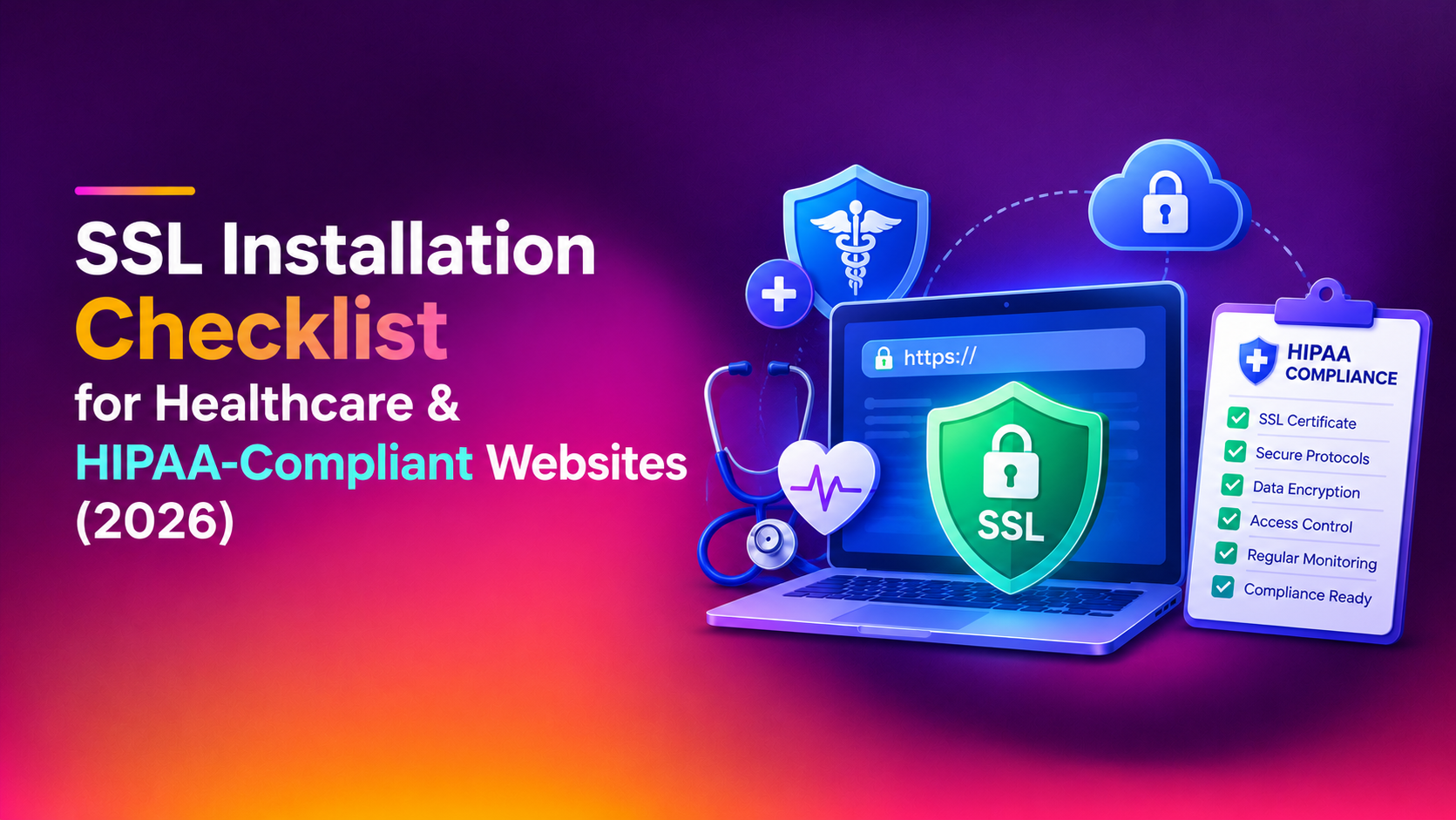
Healthcare organizations can't treat SSL installation as a routine IT checkbox. A misconfigured certificate on a patient portal, telehealth intake form, or appointment scheduler doesn't just trigger a browser warning — it can expose protected health information (PHI) in transit and put your organization in breach of HIPAA's Security Rule. This SSL installation checklist for HIPAA-compliant healthcare websites in 2026 walks through exactly what a compliant certificate setup looks like, from protocol versions to renewal automation, so your practice, clinic, or health-tech platform passes both a security audit and a compliance review.
Why SSL Installation Is a HIPAA Compliance Issue, Not Just a Security Feature
HIPAA's Security Rule requires covered entities and business associates to implement "technical safeguards" that protect electronic PHI (ePHI) in transit. SSL/TLS encryption is the primary mechanism for meeting that requirement on any patient-facing website, portal login, appointment form, or API endpoint that transmits health data. A weak or expired certificate isn't just a UX problem — auditors and OCR investigators treat it as evidence of inadequate technical safeguards.
This matters more in 2026 than it did a few years ago. Browsers now flag TLS 1.0/1.1 connections aggressively, insurance underwriters ask for SSL Labs grades during cyber-liability renewals, and patients increasingly bounce off portals that show "Not Secure" warnings. A properly installed and maintained certificate is now baseline due diligence, not a nice-to-have.
What Counts as "HIPAA-Compliant" SSL Installation
There's no single "HIPAA SSL certificate" product — HIPAA doesn't certify SSL vendors. What it requires is that your implementation meets a reasonable, documented security standard. In practice, that means:
- TLS 1.2 and TLS 1.3 only — SSLv2, SSLv3, TLS 1.0, and TLS 1.1 must be fully disabled at the server level, not just deprioritized.
- Strong key exchange and ciphers — 2048-bit RSA or ECDSA (P-256) keys, AEAD ciphers such as AES-GCM or ChaCha20-Poly1305, and ECDHE for forward secrecy.
- No mixed content — every script, image, font, and API call on a patient-facing page must load over HTTPS; a single HTTP asset breaks the encrypted chain.
- HSTS enabled — with
includeSubDomainsand ideallypreload, so browsers never fall back to an unencrypted connection. - Automated renewal — certificates that lapse mid-patient-session are both a security gap and an availability failure under HIPAA's Security Rule.
- A signed Business Associate Agreement (BAA) with your hosting provider or CA-adjacent vendor if they will ever handle or transmit PHI.
The Full SSL Installation Checklist for Healthcare Websites
Use this list literally — work through it top to bottom before you consider an SSL installation finished on any healthcare domain, subdomain, or patient-facing microsite.
Before installation
- Confirm your hosting environment is HIPAA-eligible and that a BAA is signed and on file.
- Inventory every subdomain and endpoint that touches PHI: patient portals, telehealth video links, intake forms, appointment APIs, billing pages.
- Decide on certificate type — a wildcard certificate for multi-subdomain practices, or individual certificates per service, depending on your architecture.
- Choose a Certificate Authority with a documented HIPAA-compliant issuance and revocation process.
During installation
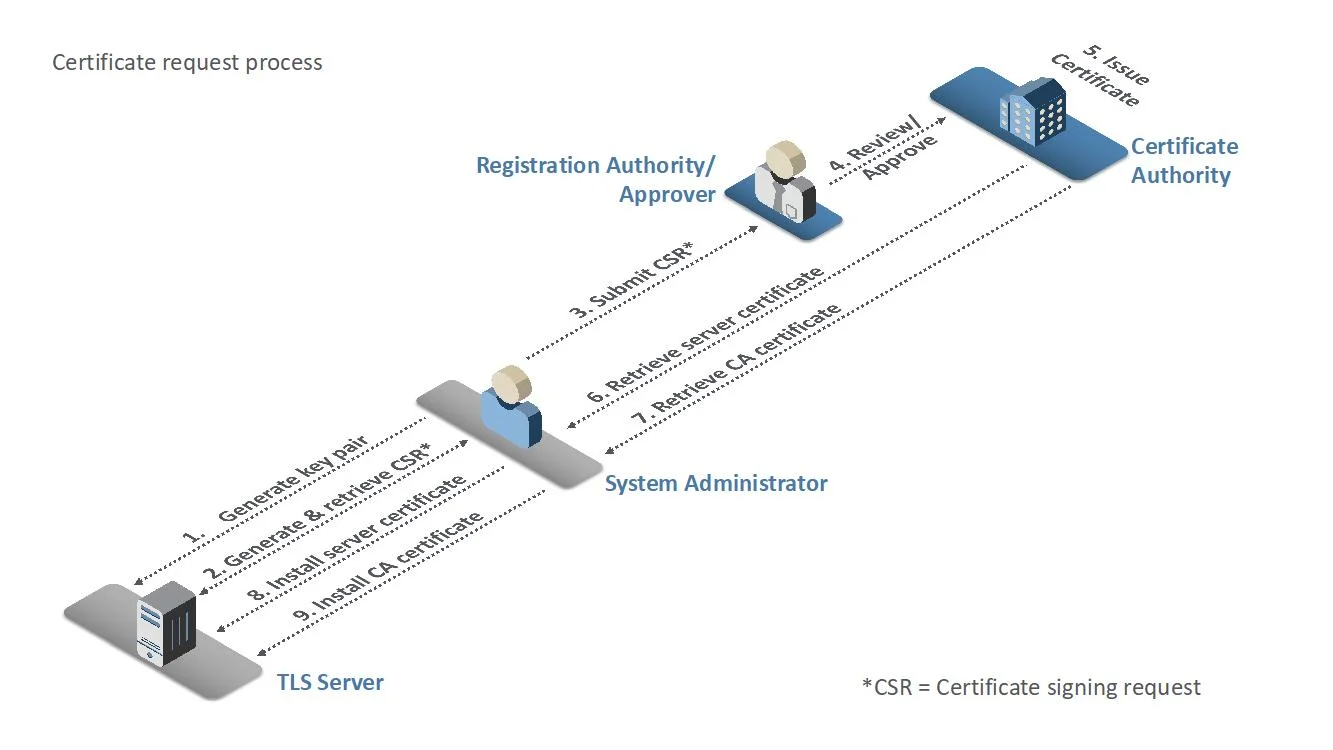
- Generate a fresh private key and CSR on the server — never reuse keys across environments.
- Install the full certificate chain, including intermediate certificates, to avoid "certificate not trusted" errors on mobile browsers.
- Force HTTPS with a 301 redirect on every HTTP request, site-wide, with no exceptions for legacy pages.
- Enable HSTS with
includeSubDomainsacross the entire domain, including marketing and support subdomains. - Disable TLS 1.0/1.1 and all legacy cipher suites in the web server configuration (Apache, Nginx, or IIS).
- Scan every page for mixed content — embedded video players, third-party analytics, and chat widgets are the most common culprits.
After installation
- Run an SSL Labs test and confirm at least an A rating; treat anything below a B as a failed installation.
- Set up automated certificate renewal (ACME/Let's Encrypt automation or CA-managed auto-renewal) with alerting 30 days before expiry.
- Document the installation date, CA, expiry date, and cipher configuration for your next HIPAA risk assessment.
- Re-test after every server migration, CDN change, or load balancer update — these are the most common causes of certificate breakage.
- Schedule a quarterly review of TLS configuration against current NIST and OWASP guidance, since acceptable ciphers change over time.
Common SSL Installation Mistakes That Create HIPAA Exposure
Most healthcare SSL problems aren't caused by skipping installation — they're caused by installations that are technically "live" but quietly non-compliant:
- Self-signed certificates left on staging environments that later get pointed to production by mistake.
- Wildcard certificates covering subdomains outside the compliance boundary, expanding your audit scope without anyone noticing.
- Expired intermediate certificates that break trust chains on specific browsers or mobile carriers, sometimes without triggering an obvious front-end error.
- Manual renewal processes that depend on one person remembering a calendar reminder — a single missed renewal on a patient portal is a reportable availability incident.
- Third-party embeds and chat widgets that quietly load resources over HTTP, breaking the mixed-content requirement even after the core site is properly configured.
Why Server Hardening Has to Go Hand-in-Hand With SSL
SSL installation protects data in transit, but it doesn't harden the server that terminates the connection. A healthcare server with a perfect A+ SSL Labs score can still be compromised through an outdated OS, an open port, or weak SSH configuration — and once an attacker is inside, the encryption in transit is irrelevant. That's why SSL work on healthcare infrastructure should always be paired with broader server hardening: firewall configuration, intrusion detection, patch management, and access control review, all documented in a way that supports your HIPAA risk assessment rather than working against it.
Why Businesses Trust CloudHouse for SSL & Server Hardening
CloudHouse works with healthcare practices and health-tech platforms that can't afford ambiguity in a compliance audit, so every certificate install comes with documented configuration, disabled legacy protocols, and verified renewal automation rather than a one-time "it's live" handoff. Because the same engineers handle both the SSL layer and the underlying server hardening, gaps between the two — the most common source of healthcare security incidents — simply don't happen. Clients get a written record of what was changed and why, which has repeatedly shortened their next HIPAA risk assessment from weeks to days.
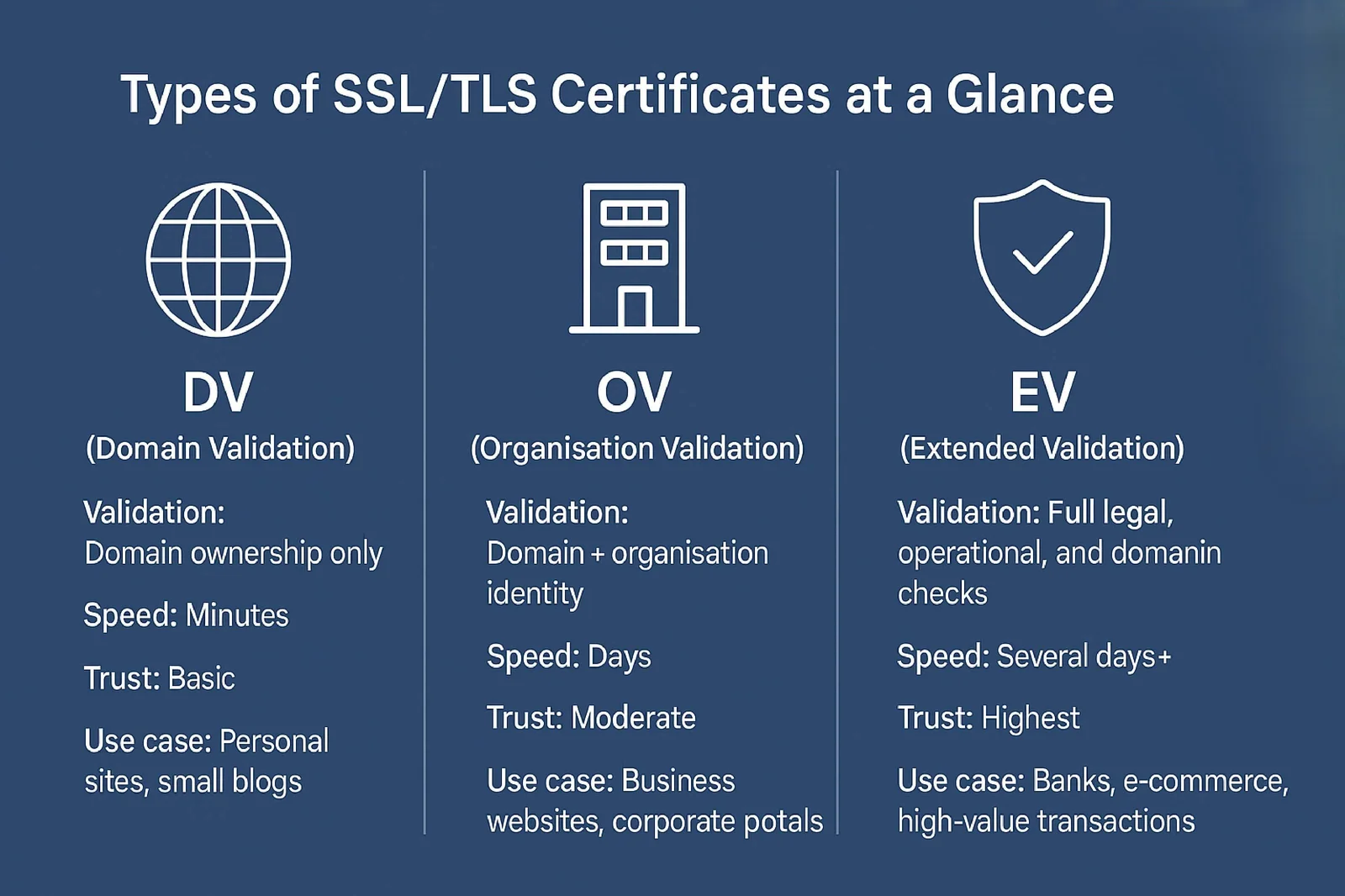
Certificate Types: Which One Fits a Healthcare Website
Not every healthcare site needs the same certificate. Choosing the wrong type is one of the quieter causes of scope creep in a HIPAA audit.
Domain Validated (DV)
DV certificates confirm you control the domain but nothing about your organization. They're fast to issue and fine for marketing pages that don't touch PHI, but they shouldn't be the only certificate protecting a patient login or intake form — auditors and security-conscious patients both look for stronger validation on anything handling health data.
Organization Validated (OV)
OV certificates verify your organization's legal existence in addition to domain control. This is the practical baseline for most patient portals, telehealth scheduling pages, and billing systems — strong enough to satisfy a reasonable security standard without the cost and paperwork of EV.
Extended Validation (EV)
EV certificates involve the deepest vetting and were historically shown with a green address bar. Modern browsers no longer visually distinguish EV as prominently, but some larger hospital systems and insurers still require it contractually for public-facing patient-data systems, so check your BAAs and vendor contracts before assuming OV is sufficient.
Wildcard and Multi-Domain (SAN)
A wildcard certificate (*.yourpractice.com) covers every subdomain under one certificate, which is convenient for practices running a main site, a patient portal subdomain, and a telehealth subdomain. The tradeoff is scope: if any one subdomain is compromised, the same certificate and key are exposed everywhere it's installed. Multi-domain (SAN) certificates let you list specific subdomains explicitly, which keeps your compliance boundary tighter and easier to document during a risk assessment.
Telehealth-Specific SSL Considerations
Telehealth platforms add complexity that a standard business website doesn't have to deal with, and each of these needs to be checked separately during SSL installation:
- WebRTC and video signaling servers often run on separate subdomains or ports from the main site and need their own valid certificates — it's common to secure the main portal but overlook the video infrastructure behind it.
- Mobile app API endpoints used by patient-facing apps need certificate pinning reviewed whenever a certificate is renewed or rotated, or the app will silently fail to connect after a routine renewal.
- Third-party integration partners (e-prescribing, lab result feeds, insurance verification APIs) each terminate their own TLS connections; confirm their configuration meets the same TLS 1.2/1.3-only standard you're enforcing on your own domain, since a weak link anywhere in the chain becomes part of your risk profile.
- Session timeout and re-authentication over the encrypted connection should be tested after any certificate change, since some load balancer or reverse proxy updates that accompany SSL work can inadvertently affect session handling.
Building SSL Renewal Into Your HIPAA Risk Assessment Cycle
HIPAA's Security Rule requires periodic risk assessments, and SSL configuration should be an explicit line item rather than an assumption. A practical cadence looks like this:
- Monthly: automated expiry monitoring with alerts at 30 and 7 days before any certificate lapses.
- Quarterly: an SSL Labs scan across every patient-facing subdomain, compared against the previous quarter's grade to catch silent regressions from server or CDN changes.
- Annually (minimum): a full TLS configuration review against current NIST and OWASP guidance, since cipher recommendations and minimum key sizes shift over time as computing power increases and new vulnerabilities are published.
- Event-driven: a re-check after every server migration, load balancer swap, CDN onboarding, or hosting provider change — these are, by a wide margin, the most common triggers for certificates breaking or silently reverting to weaker defaults.
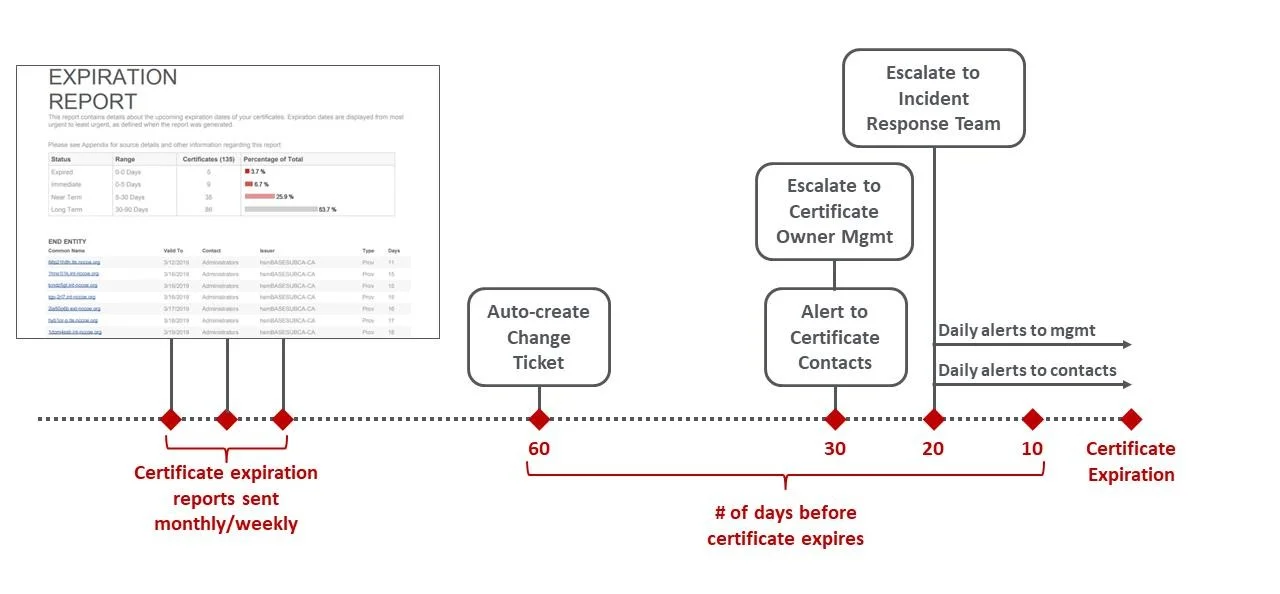
Documenting this cycle — not just performing it — is what turns SSL installation from a one-time technical task into evidence your compliance officer can hand an auditor without scrambling to reconstruct history.
Documentation to Keep for Every SSL Installation
Beyond the technical configuration, HIPAA risk assessments want a paper trail. For every certificate you install on a healthcare domain, keep a record of: the issuing CA and certificate type, the installation date and expiry date, the TLS versions and cipher suites enabled at install time, the results of the post-installation SSL Labs scan, and the name of the engineer or vendor who performed the work. This sounds like overhead, but it's the difference between answering an auditor's question in five minutes and spending a week reconstructing what happened on a server six months ago.
Conclusion
A HIPAA-compliant SSL installation isn't a single task you check off — it's a configuration standard you maintain: modern protocols only, zero mixed content, HSTS everywhere, automated renewal, and documentation your compliance team can actually use. Run through the checklist above before your next audit, and pair it with proper server hardening so the encryption you've installed is actually protecting a secure server underneath it.