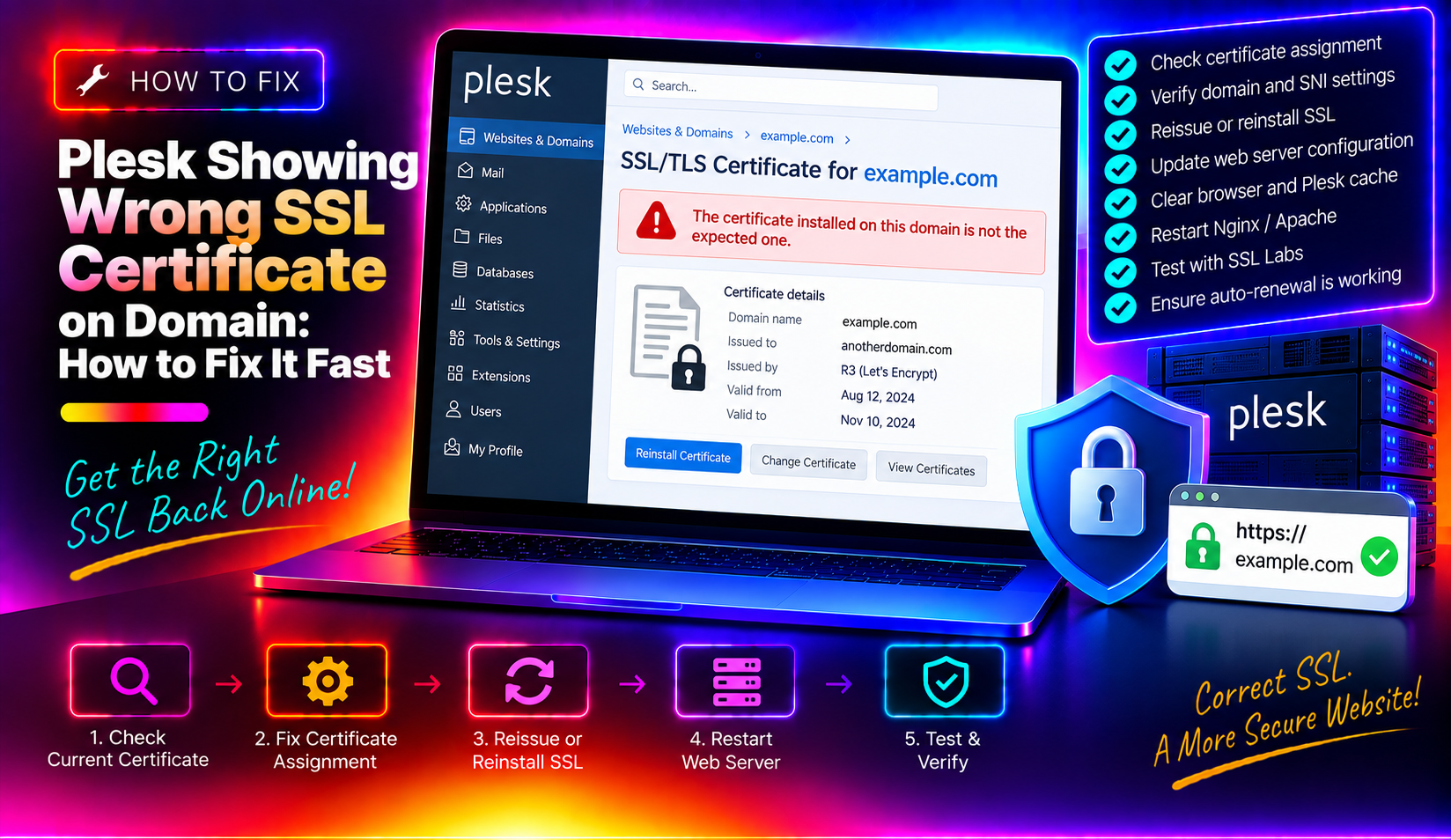
If Plesk is showing the wrong SSL certificate on your domain — even after you've assigned the correct one — you're not alone. This is one of the most frustrating SSL issues a sysadmin can face: browsers throw NET::ERR_CERT_COMMON_NAME_INVALID warnings, clients call in a panic, and the Plesk UI insists everything looks fine. This guide covers the complete diagnostic flow for fixing a plesk wrong ssl certificate showing problem, including the shared-IP conflict scenario that most tutorials miss entirely.
Why Plesk Serves the Wrong SSL Certificate
Before jumping into fixes, it helps to understand how Plesk decides which certificate to serve. When a browser connects over HTTPS, the web server reads the SNI (Server Name Indication) field in the TLS ClientHello to pick the right virtual host and certificate. If SNI resolution breaks down anywhere in the chain, the server falls back to a default certificate — which is almost always the wrong one.
The most common root causes are:
- Wrong certificate selected in Hosting Settings — the most obvious cause, but not always the real one.
- Shared-IP default vhost conflict — when SNI fails or the client doesn't send it, the server's default vhost certificate is served instead of the domain-specific one.
- Nginx/Apache vhost config not regenerated — Plesk wrote the new certificate to its database but never updated the actual web server config files on disk.
- Third-party module interference — BitNinja WAF 2.0, Proxmox, or similar security tools can intercept and substitute their own certificate at the TLS layer.
- DNS pointing to a different server — the domain A record resolves to an old IP that still holds the old certificate.
- SNI disabled in Plesk — if
SNI_SUPPORTis not enabled in/etc/psa/psa.conf, Plesk cannot serve per-domain certificates on a shared IP.
💡 None of these worked? Skip the guesswork.
Get Expert Help →Step 1: Verify Which Certificate Is Actually Being Served
Don't trust your browser cache. Use a command-line check or an external tool to see the raw TLS handshake:
openssl s_client -connect yourdomain.com:443 -servername yourdomain.com 2>/dev/null | openssl x509 -noout -subject -issuer -datesThe -servername flag explicitly sends the SNI field. Note the subject CN returned. If it matches a different domain, that's your culprit certificate.
openssl s_client -connect yourdomain.com:443 2>/dev/null | openssl x509 -noout -subjectIf this returns a different CN than the SNI-aware test above, you have a default vhost conflict — the most common shared-IP scenario.
dig +short yourdomain.com A
curl -v --resolve yourdomain.com:443:<your-server-ip> https://yourdomain.com/ 2>&1 | grep "subject:"
If the dig result is an unexpected IP, the certificate mismatch is a DNS problem, not a Plesk configuration problem.
2. Click the domain name → Hosting & DNS tab → Hosting Settings.
3. Scroll to the SSL/TLS certificate dropdown. Confirm the correct certificate is selected. If not, select it and click OK.
4. Check the SSL/TLS Certificates section too. Go to Websites & Domains → domain → SSL/TLS Certificates. Confirm the target certificate shows a green tick next to "Secured" state. If it shows an error or "Not used", the issue is in how Plesk linked the certificate to the vhost.
5. For mail server certificate conflicts (Dovecot/Postfix showing the wrong cert), go to Tools & Settings → SSL/TLS Certificates → select the correct certificate → click "Secure Plesk, mail, and other hosting services".
Step 3: Check IP-Based Certificate Conflicts on Shared IPs
This is the step most guides skip — and the most common cause of persistent wrong-certificate issues on shared hosting servers.
1. Verify SNI is enabled in Plesk
grep SNI_SUPPORT /etc/psa/psa.confThe output should be SNI_SUPPORT true. If it's missing or set to false, SNI is disabled and Plesk will serve the same certificate for all domains on a shared IP.
To enable it:
plesk bin server_pref --update -sni-support trueplesk bin ipmanage --infoLook for your server's shared IP address. The certificate listed next to it is the default vhost certificate — the one served when SNI fails. If this is an old domain's certificate, update it:
plesk bin ipmanage --update <ip-address> -ssl_certificate "<certificate-name>"Shared hosting setups often have a Plesk panel certificate (e.g., *.plesk.page or a self-signed cert) assigned as the default IP certificate. When a domain's SNI config is incomplete, the browser gets this panel cert instead. In Plesk UI: go to Tools & Settings → IP Addresses → click the IP → confirm the SSL/TLS certificate field does not hold the incorrect cert.
# For Apache + Nginx (Plesk default)
plesk repair web -all

# Or for a single domain only
plesk repair web yourdomain.com
This command re-reads the Plesk database and rewrites all vhost config files from scratch. It is the fastest way to sync the "what Plesk thinks" state with "what the web server has on disk".
cat /etc/nginx/plesk.conf.d/vhosts/yourdomain.com.conf | grep ssl_certificateThe path after ssl_certificate should point to a file with your domain's name. If it points to a different domain's certificate file, plesk repair web yourdomain.com didn't fix it — check the Plesk internal database:
plesk db "SELECT d.name, c.name as cert_name FROM domains d LEFT JOIN certificates c ON d.ssl_cert_id = c.id WHERE d.name='yourdomain.com';"If cert_name is NULL or wrong here, the certificate assignment was never saved at the database level.
service nginx restart
service httpd restart   # CentOS/RHEL
# or
service apache2 restart # Ubuntu/Debianplesk repair web -all
/usr/local/lsws/bin/lswsctrl restartStep 5: Validate with External SSL Checker Tools
After applying fixes, always validate from outside the server — not just your browser (which may cache the old certificate).
1. Run the openssl SNI check again (same as Step 1) and confirm the correct CN is returned.
2. Use SSL Labs for a full chain validation
Go to https://www.ssllabs.com/ssltest/ and enter your domain. SSL Labs shows the full certificate chain, the exact certificate being served (with CN and SAN), SNI support status, and whether the chain is complete. A correct result will show your domain name as the CN in the leaf certificate.
curl -vI https://yourdomain.com 2>&1 | grep -E "subject|issuer|SSL connection"4. Test from a different network to rule out ISP-level interception or CDN caching. If you're behind Cloudflare, the cert shown by SSL Labs is Cloudflare's edge cert — check the origin cert separately:
curl -vI --resolve yourdomain.com:443:<origin-server-ip> https://yourdomain.com 2>&1 | grep subject5. Check for third-party interference (BitNinja, ModSecurity, etc.) — if the SSL checker shows a certificate from a vendor like BitNinja, disable HTTPS interception in that tool:
- BitNinja: Dashboard → WAF 2.0 → Disable HTTPS mode → restart BitNinja
- Proxmox-based setups: check if the hypervisor's reverse proxy is terminating TLS before Plesk
FAQs
Why does Plesk show the correct certificate in the UI but the browser still shows the wrong one?
The Plesk UI reflects what's stored in the internal database, but the web server (Nginx/Apache) reads its own config files on disk. If those files were not regenerated after the certificate change, the web server keeps serving the old cert. Run plesk repair web yourdomain.com and restart the web server to sync them.
What is SNI and why does it matter for SSL in Plesk?
SNI (Server Name Indication) is a TLS extension that lets the browser tell the server which domain it's connecting to before the TLS handshake completes. Without SNI, a server with multiple domains on one IP address can only serve one certificate for all of them — which causes the wrong certificate to appear for every domain except the default one.
How do I find out which certificate Plesk is using as the default for a shared IP?
Run plesk bin ipmanage --info in the server CLI. It lists all IP addresses and their currently assigned default certificates. You can also check via Plesk UI under Tools & Settings → IP Addresses.
Can a CDN like Cloudflare cause Plesk to appear to serve the wrong SSL certificate?
Yes. If the domain is proxied through Cloudflare, SSL checkers and browsers see Cloudflare's edge certificate — not the one installed on your Plesk server. To check the origin certificate directly, use curl --resolve with the real server IP to bypass Cloudflare, or temporarily enable "DNS only" mode in Cloudflare to test the origin cert.
Does plesk repair web interrupt live traffic?
The plesk repair web command regenerates config files and performs a graceful reload of Nginx/Apache — it does not hard-stop the web server. In-flight requests are typically completed before the reload applies. There is a very brief config reload window (under one second) where new connections may see a momentary delay, but live traffic is not dropped.
Fixing a Plesk incorrect SSL certificate issue almost always comes down to one of three root causes: a stale web server config that hasn't been regenerated since the certificate change, a shared-IP default vhost serving the wrong cert when SNI fails, or a third-party tool intercepting TLS at the network layer. Work through the five steps above in order — verify what's actually being served first, then fix the Plesk assignment, then the IP-level default, then regenerate configs, and finally validate externally. If you need hands-on help diagnosing certificate mismatches or hardening your server's SSL configuration, the CloudHouse server management service team is available 24/7.