
A ride-hailing or mobility app is judged in the few seconds a rider waits for a match. If dispatch lags, a map tile fails to load or a payment hangs at the end of a trip, the rider opens a competitor's app instead. This guide explains DevOps support for ride-hailing and mobility startups: what the work involves, which tasks your own engineers should keep, and which are better handled by an outside team. It is written for founders and engineering leads who are shipping fast and starting to feel the operational strain.
Nothing here promises a particular result, and every platform is different. Use it as a framework, then ask any provider for an itemised quote against your own stack. If you want to see how we scope this kind of engagement, our DevOps support service page is a good starting point.
Why mobility platforms are an unusual DevOps problem
Most web products have gentle, predictable traffic. Mobility products do not. Demand follows commutes, rain, concerts, airport arrivals and festivals, and it can change within minutes in a single neighbourhood. That shapes almost every infrastructure decision.
- Spiky, local demand: load concentrates around a few zones and a few hours, so average capacity is a poor guide to what you need at the peak.
- Real-time by default: driver locations, ETAs and trip states are constantly updating, and stale data is a visible product failure.
- Many third parties: maps, payment gateways, SMS, push notifications and identity checks all sit in the critical path of a single trip.
- Two mobile apps plus an ops dashboard: rider and driver releases must stay compatible with the backend, and old app versions linger on phones for a long time.
- Operating around the clock: a trip at 3 a.m. is still a trip, and nobody on the team may be awake to notice a failing service.
Peak-hour autoscaling that follows real demand
Autoscaling sounds simple until you test it against a mobility workload. Scaling on CPU alone often reacts too late, because the real bottleneck may be a message queue, a database connection pool or a websocket gateway. Good DevOps support starts by finding which resource saturates first in your system, then scaling on that signal.
Practical measures usually include scheduled scale-up ahead of known rush hours, scaling rules tied to request queue depth or active connections, warm capacity for the services that start slowly, and load tests that simulate a sudden surge in ride requests. It also means setting sensible upper limits, so a runaway loop or a bot does not quietly create a very large cloud bill. A team that supports you should be able to explain which signals trigger scaling and what happens when the limit is reached.
Real-time location and dispatch services
The dispatch path is the heart of the product. It typically combines a stream of driver location updates, a matching service, a state machine for each trip and push or socket notifications to both apps. From an operations point of view, the risks are different from those of a standard web application.
- Message backlog: if location events pile up in a queue, matching quietly works from out-of-date positions.
- Connection storms: after a network blip, thousands of apps reconnect at once and can overwhelm the gateway.
- Hot partitions: a busy city zone can overload one shard of a datastore while the rest sit idle.
- Stuck trips: a crashed worker can leave a trip in a state that neither rider nor driver can exit.
DevOps support here means monitoring queue lag and connection counts, adding back-off and rate limits, designing graceful degradation, and writing runbooks for stuck-trip clean-up. Developers still own the matching logic, while the operations side keeps the platform underneath it stable.
Payment and maps integrations: managing outside dependencies
Payments and maps are the two integrations riders notice immediately. You do not control their uptime, but you do control how your platform behaves when they struggle.
For payments, that means idempotent requests so a retry does not charge a rider twice, clear handling of pending and failed states, secure storage and rotation of API credentials, webhook verification, and alerts when the failure rate for a gateway rises. For maps and routing, it means caching where the terms of service allow, watching quota and rate limits so a busy evening does not exhaust them, and a fallback behaviour when a provider is slow. Keep a record of every external dependency, who owns the account, and where its keys are stored. That register becomes invaluable during an incident.
CI/CD for frequent mobile and backend releases
Mobility startups release often, because pricing rules, city launches and driver incentives change constantly. Without a dependable pipeline, each release becomes a risk that people postpone, and fixes reach users slowly.
A sound setup usually has automated tests on every change, build pipelines for both iOS and Android, staged rollouts that expose a new version to a small share of users first, feature flags so a risky change can be switched off without a new release, and a documented rollback path. Backend changes also need care: because older app versions stay in use, API and database changes should be backward compatible. Database migrations should be reviewed for locking behaviour before they touch a live trip table. Our managed DevOps support team can set up and maintain these pipelines alongside your developers.
On-call monitoring and incident response
Monitoring for a mobility product should reflect the rider experience, not just server health. A server can look healthy while no ride requests are being matched. Useful signals include the rate of ride requests that end in a match, time from request to driver assignment, payment success rate, push delivery delays and app crash rates after a release.
Alerts should be few and meaningful, each linked to a runbook that says what to check first. A rota means someone is always reachable, with a clear escalation path if the first person does not respond. When something does break, the process matters as much as the fix:
- Acknowledge the alert and decide who leads the incident.
- Limit the damage first, for example by switching off a feature flag or shifting traffic, before hunting for the root cause.
- Keep a simple timeline of what was seen and changed.
- Communicate to support staff and, where needed, to riders and drivers.
- Hold a blameless review afterwards and turn lessons into concrete fixes.
Who handles which DevOps task: a practical table
Many startups struggle because ownership is vague. Developers assume operations covers something, and operations assumes developers do. The table below shows a common split between your in-house engineers and an outside DevOps support partner. Adjust it to your team size and skills.
| DevOps task | Your in-house engineers | DevOps support partner |
|---|---|---|
| Matching and pricing logic | Own the design, code and behaviour | Advise on performance and deployment impact |
| Peak-hour autoscaling rules | Share expected demand and event calendars | Design, test and tune scaling policies and limits |
| Queue, socket and datastore health | Fix application-level causes | Monitor, tune and resolve platform-level causes |
| Payment gateway integration | Own business rules and reconciliation logic | Manage credentials, webhook security and failure alerts |
| Maps and routing quotas | Choose providers and usage patterns | Watch quotas, caching and fallback behaviour |
| CI/CD pipelines | Write tests and approve releases | Build, maintain and secure the pipelines and rollback paths |
| Mobile release rollout | Prepare app builds and release notes | Support staged rollout automation and crash monitoring |
| On-call monitoring | Handle code-level bugs escalated to them | Run alerting, the rota and first response |
| Incident response and reviews | Join for application faults | Lead coordination, timeline and follow-up actions |
| Cloud cost control | Flag features that will change usage | Review spend, right-size resources and set budget alerts |
| Security patching and access | Follow secure coding practices | Patch servers, manage access and rotate secrets |
The pattern is straightforward. Your developers keep the product logic, and the partner keeps the platform predictable. Where a task sits on the boundary, write down a single named owner.
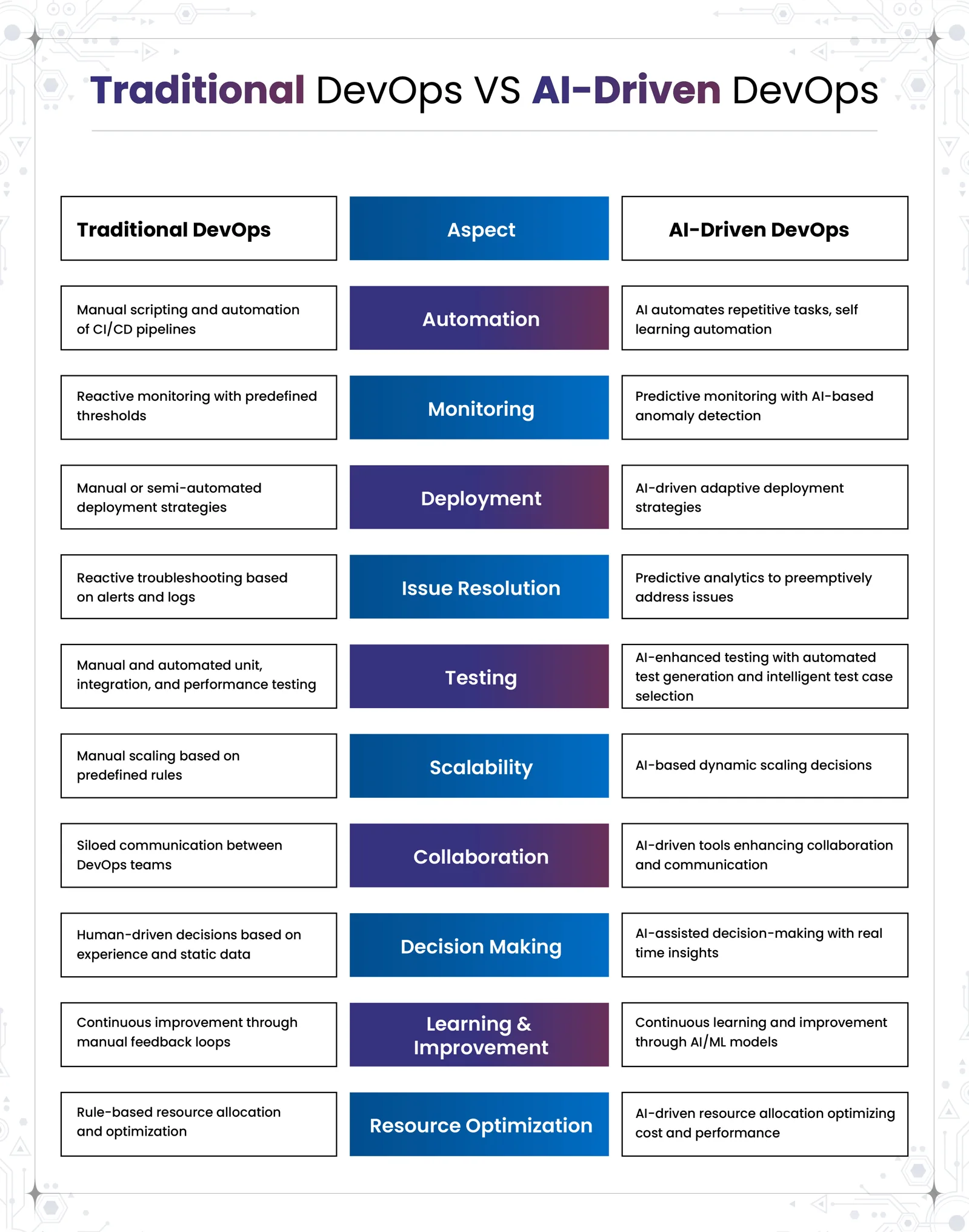
Whichever way you split the work, the tooling matters too. The comparison below shows how traditional DevOps practice differs from an AI-driven approach across automation, monitoring, deployment, scaling and more.
What affects the cost of DevOps support
We do not quote prices in articles, because they depend on your scope. These are the factors that usually move a quote up or down, so you can compare providers fairly.
- The number of services, cities or regions you operate in.
- Whether you need round-the-clock cover or business hours with an emergency line.
- How many cloud accounts, environments and mobile pipelines need maintaining.
- The level of existing automation and documentation you already have.
- Compliance expectations around payment data and rider personal data.
- Response-time commitments written into the support agreement.
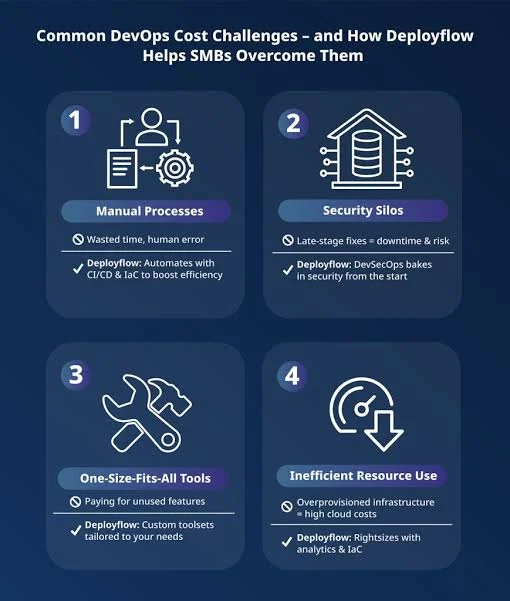
Ask every provider for an itemised quote that separates one-off setup from ongoing support, so the two are not blended into one number.
How to judge whether a partner understands mobility
A generic managed-hosting company can keep servers running, but a mobility platform needs more. Ask a candidate how they would scale a dispatch service before a Friday evening peak, what they would monitor besides CPU, how they handle a payment gateway outage mid-trip, and how they roll back a mobile-backed API change safely. Specific answers about queues, retries, staged rollouts and runbooks are a better sign than broad promises about uptime. Also ask what you will own at the end: you should keep access to your cloud accounts, your pipelines and your documentation, so you are never locked in.
A sensible way to start
Few startups need to outsource everything on day one. A common first step is a short assessment covering your cloud setup, scaling behaviour, release pipeline and alerting. The result is a prioritised list: fix the alerting gaps first, then the release process, then the scaling rules. From there, you can decide whether you want project work, ongoing support or a mix. Our DevOps support for growing platforms follows this staged approach.
Why Companies Choose CloudHouse for DevOps Support
Clients come to CloudHouse because we plan delivery in clear stages, stay available for support after launch and provide transparent, itemised quotes so you can see what each part costs. We work alongside your developers instead of replacing them, and we document what we build so you keep control. You can read more about how we work on our DevOps support service page.
Conclusion
Ride-hailing and mobility startups carry unusual operational pressure: sharp demand peaks, real-time dispatch, dependence on payment and maps providers, and constant mobile releases. Good DevOps support turns those risks into routine work through demand-aware autoscaling, healthy queues, dependable pipelines, meaningful alerts and a rehearsed incident process. Decide who owns each task, keep product logic with your own engineers and bring in a partner for the platform layer. To discuss your stack and receive an itemised proposal, visit our DevOps support service page and request a quote.