If you run an online store — anywhere from a single-brand Shopify shop doing a few hundred orders a day to a multi-region marketplace processing checkout traffic across several domains — "just get an SSL certificate" is not useful advice anymore. You already have HTTPS. The real question chewing up your Friday afternoon is: which SSL installation provider can actually keep your checkout, your payment gateway integration, and your PCI DSS posture intact through renewals, migrations, and traffic spikes — without breaking anything at 2am on Black Friday?
This guide is a buyer's evaluation framework, not a certificate-authority comparison chart. We'll walk through the exact criteria to score a provider on before you sign a contract, the red flags that show up in sales calls but not in demos, and where a managed SSL installation service like CloudHouse Technologies' server hardening service fits if you're evaluating a done-for-you option instead of managing certificates in-house.
Why "Cheap SSL" Is the Wrong Starting Question
Every hosting panel, domain registrar, and CDN now bundles a free Let's Encrypt certificate. That commoditization is good news for basic encryption — and it's exactly why "who has the cheapest SSL" is the wrong evaluation question for an ecommerce store. Encryption is table stakes. What separates a provider that protects your revenue from one that quietly puts it at risk is what happens around the certificate: how renewals are automated, whether the setup actually satisfies PCI DSS requirements for a card-data environment, how fast someone answers when checkout throws a mixed-content warning, and whether the installation is architected for your actual domain structure — not a generic single-domain blog.
Get any of those wrong and the failure mode isn't abstract. It's a red padlock warning on your checkout page during a flash sale, an expired certificate silently failing an ACME renewal over a long weekend, or a PCI scan that flags your store the week before a compliance deadline.
The Ecommerce SSL Provider Evaluation Checklist
Score every provider on your shortlist against this table before you sign anything. A serious vendor will answer all five rows without hedging or redirecting you to a generic FAQ page.
| Evaluation criterion | What to ask | Red flag answer |
|---|---|---|
| Certificate types supported | Do you support OV/EV certificates for the checkout domain, plus wildcard or multi-domain (SAN) coverage for our subdomains and regional storefronts? | "We only do free DV certificates" with no path to OV/EV for the payment pages |
| Renewal automation | Is renewal fully automated via ACME with DNS-01 validation, with logging and alerting if a renewal fails? | "You'll get an email reminder to renew manually" — the single biggest cause of expired-certificate outages |
| PCI DSS compliance support | Can you document that the TLS configuration (protocol versions, cipher suites, HSTS) meets current PCI DSS requirements for our card-data environment, and will you provide evidence for our next audit? | Vague reassurance with no documentation, scan report, or audit trail offered |
| Incident response time | What is your guaranteed response time if checkout throws a certificate error during peak traffic — and is that in writing (SLA), not just a sales promise? | No written SLA, or a response window measured in business days |
| Pricing structure | Is pricing per-domain, per-server, or a flat managed fee — and what happens to the price when we add a new regional storefront or subdomain? | Pricing that scales unpredictably per certificate with no volume or managed-service option |
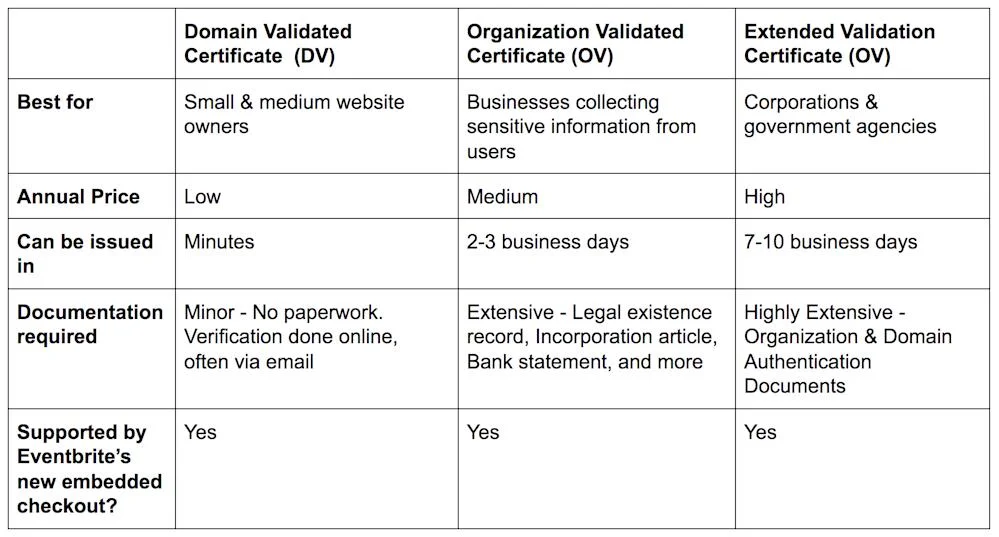
Certificate Types: Match the Certificate to Your Storefront Architecture
Domain Validation (DV) certificates are fine for a marketing blog. They are not the right choice for a checkout flow that's asking customers to trust you with card data. Organization Validation (OV) certificates — which verify your business identity, not just domain control — are the de facto standard for ecommerce payment pages, and Extended Validation (EV) is still used by some larger retailers for the extra identity assurance it signals.
Beyond validation level, think about domain structure. If you run one storefront on one domain, a single OV certificate is enough. If you run subdomains for regional stores, a staging environment, an API, and a customer portal, you need either a wildcard certificate (covers unlimited subdomains under one root domain) or a multi-domain (SAN) certificate (covers a defined list of separate domains). Wildcards are simpler to automate — one renewal protects the entire subdomain tree — but SAN certificates give you tighter control over exactly which hostnames are covered. A provider worth hiring will map your domain structure with you before recommending either, not default to whichever is easier for them to sell.
Automation and Renewal: The Part Most Stores Get Wrong
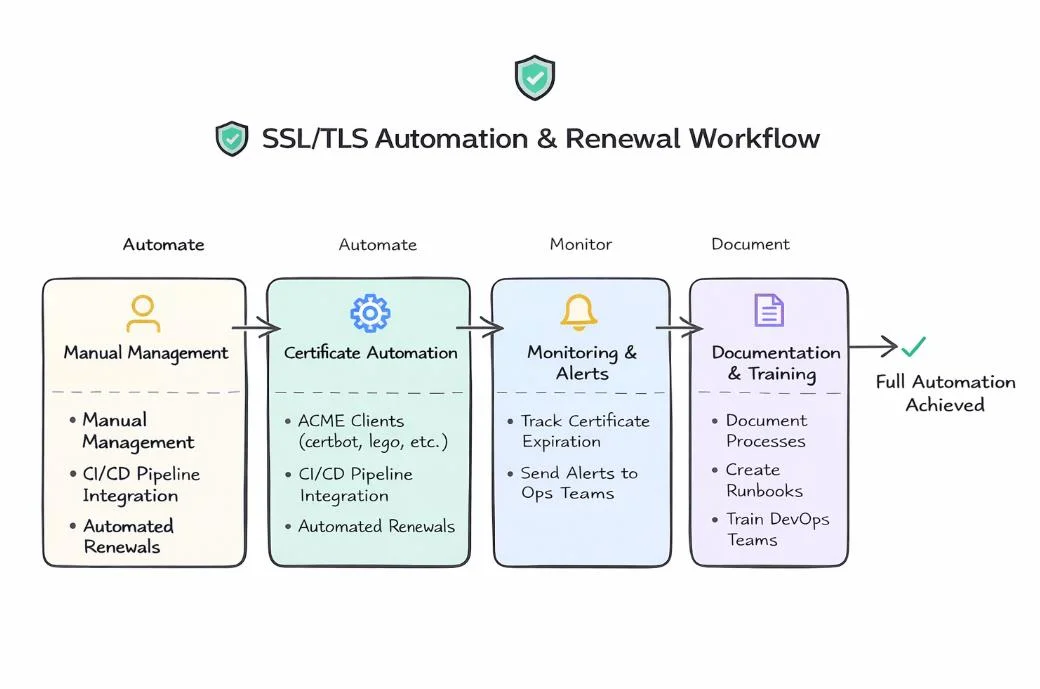
Manual certificate renewal is the single most common cause of ecommerce SSL outages — not a sophisticated attack, just a certificate nobody remembered to renew. The fix is ACME-based automation (the same protocol underlying Let's Encrypt), which handles issuance and renewal on a schedule with no human step in the loop. For wildcard certificates specifically, ACME requires DNS-01 challenge validation rather than the simpler HTTP-01 method, which means your provider needs either API access to your DNS or a delegated zone set up in advance — ask about this explicitly, because it's the step vendors skip when they're in a hurry to close the deal.
The provider you choose should also be able to answer: what happens if a renewal fails? A credible answer includes automated alerting to a monitoring channel, a fallback manual renewal path, and logs you can review — not "we'll notice eventually." If you're managing more than a handful of certificates across storefronts, staging, and internal tools, you've crossed the threshold where ad hoc renewal stops being a manageable process and a managed lifecycle approach — the kind built into a proper server hardening engagement — becomes the safer bet.
PCI DSS: SSL Is Necessary but Not Sufficient
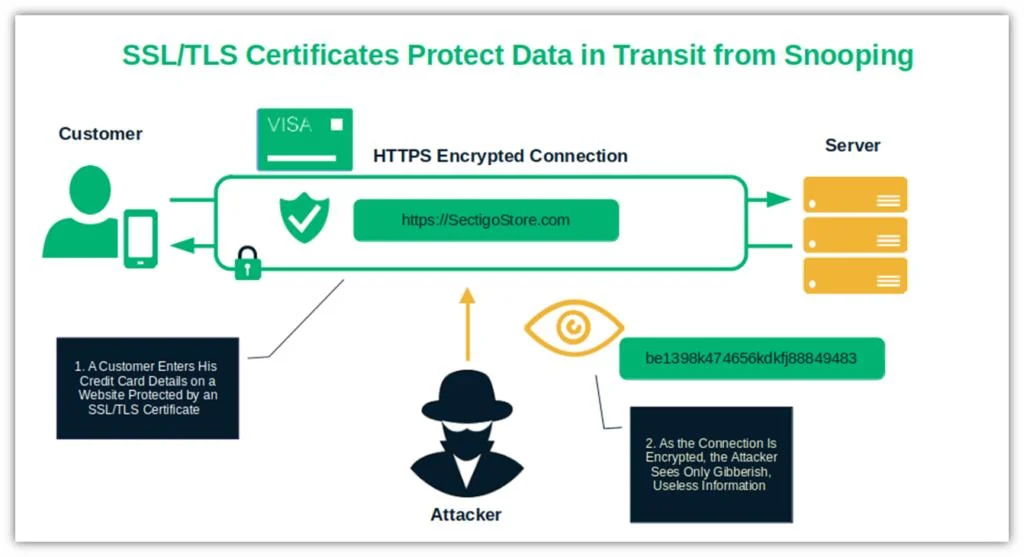
A common misconception among store owners is that installing an SSL certificate satisfies PCI DSS on its own. It doesn't. PCI DSS requires strong cryptography and security protocols across the transmission of cardholder data — which means the certificate has to be paired with correct TLS protocol configuration (no TLS 1.0/1.1), properly configured cipher suites, HSTS enforcement, and no mixed-content leaks where an HTTP resource loads inside an HTTPS page and quietly breaks the padlock.
A provider who only installs the certificate and walks away has handed you half a compliance requirement.
Before signing with any installation provider, ask them to show you — not just tell you — the TLS configuration they'll apply, and ask whether they'll produce documentation or a scan report you can hand to your PCI assessor. If they can't produce that on request, they're not equipped to support an ecommerce card-data environment, no matter how fast their certificate installs.
Will This Slow Down My Checkout?
This is the objection every ecommerce owner raises, and it's a fair one — TLS handshakes do add a small amount of latency. In practice, a correctly configured modern certificate (using TLS 1.3, OCSP stapling, and a properly sized key) adds single-digit milliseconds to page load, which is not the bottleneck in a typical checkout flow. The real performance risk isn't TLS itself; it's a badly configured certificate chain — missing intermediate certificates, outdated protocol support forcing fallback negotiation, or a certificate hosted on a server with no HTTP/2 or OCSP stapling enabled. That's a configuration problem, not an inherent SSL problem, and it's exactly what a competent installation provider should be tuning as part of the setup, not leaving for you to discover in a page speed audit later.
Response Time and Support: What "24/7 Support" Actually Means
Every provider claims 24/7 support. Few will put a response time in writing. Before you commit, get a specific, contractual answer to: if our checkout throws a certificate error at 11pm during a sale, how fast does a human respond, and what's the escalation path? A vendor selling shared hosting SSL add-ons typically cannot answer this with anything more than a ticket queue. A managed security or server hardening provider that treats certificate uptime as part of your infrastructure — not a bolt-on product — should be able to give you an actual SLA number.
Pricing: Compare the Right Thing
Per-certificate pricing looks cheap until you add a third regional storefront, a staging subdomain, and a customer portal — at which point per-domain billing from a generic SSL reseller can quietly outpace a flat managed-service fee that includes monitoring, renewal automation, and incident response. When comparing quotes, normalize for what's actually included: is renewal automation part of the price, or a paid add-on? Is PCI-relevant configuration included, or billed as a separate audit? Is support inside the base fee, or metered per incident? A lower sticker price with none of that included is usually the more expensive option within twelve months.
Where a Managed Provider Earns Its Fee
If your store is small, low-traffic, and running on a single domain, a free automated certificate from your host is often genuinely enough. The calculus changes once you're running multiple storefronts, integrating a payment gateway that expects a hardened TLS configuration, or operating under PCI DSS obligations that require documented evidence, not just a green padlock. At that point, the value of a managed provider isn't the certificate — it's the surrounding discipline: automated renewal with alerting, PCI-aligned configuration, a written response SLA, and someone accountable when something breaks during your highest-revenue week of the year. That's the gap CloudHouse Technologies' server hardening service is built to close for ecommerce infrastructure specifically, rather than treating SSL as a generic checkbox.
Get a Straight Answer Before You Sign
Before you commit to any SSL installation provider, run their answers against the checklist table above. If they can't produce a written SLA, can't explain their ACME renewal automation, or can't document PCI-relevant TLS configuration, keep shopping — an ecommerce checkout page is the wrong place to find out a provider was cutting corners.
Want a second opinion on your current SSL setup, or need a provider that treats certificate management as part of a hardened server, not an isolated add-on? Talk to CloudHouse Technologies about server hardening for your storefront and get a specific, written evaluation of your current configuration before your next renewal cycle or peak sales event.
Frequently Asked Questions
1. Will switching SSL providers or reconfiguring my certificate slow down my checkout page?
No — when the migration is done correctly. A properly configured certificate chain with TLS 1.3, OCSP stapling, and HTTP/2 enabled adds negligible latency. The performance risk comes from a badly configured chain (missing intermediates, outdated protocol fallback), not from switching providers itself. Ask any new provider to confirm they'll test checkout page load times before and after the change.
2. How often do SSL certificates need to be renewed, and can it be automated for an ecommerce store?
Most publicly trusted certificates today are issued for 90 days to 398 days depending on the certificate authority and type, and renewal should always be automated via ACME rather than tracked manually. For a store running multiple domains or subdomains, ask specifically about wildcard or SAN renewal automation, since these require DNS-01 validation and slightly more setup than a single-domain certificate.
3. Does an SSL certificate alone make my store PCI DSS compliant?
No. SSL/TLS encryption is one requirement among many in PCI DSS. Compliance also depends on correct TLS protocol and cipher configuration, HSTS enforcement, no mixed-content leaks, and broader controls over how cardholder data is stored, processed, and transmitted across your systems. Treat SSL installation as necessary infrastructure, not a full compliance solution.
4. What's the difference between a wildcard and a multi-domain (SAN) certificate for an ecommerce business?
A wildcard certificate covers one root domain plus unlimited subdomains under it (e.g. shop.yourstore.com, api.yourstore.com) and is simpler to automate since one renewal covers everything. A multi-domain (SAN) certificate covers a fixed list of distinct domains you specify — useful if you run entirely separate domains for different regional stores rather than subdomains of one root domain.
5. What should I do if my current SSL provider can't give a written response-time guarantee?
Treat it as a disqualifying answer for an ecommerce store. Certificate errors during peak traffic are a revenue event, not a minor bug — any provider unwilling to commit a response time in writing is telling you, in effect, that your checkout uptime isn't their priority. Shortlist providers who treat SSL as part of managed infrastructure with an actual SLA.