

cPanel was the undisputed king of web hosting control panels for over two decades — until a pricing overhaul in 2019 turned thousands of hosting providers and sysadmins against it overnight. Today, switching to a cPanel alternative is not just about saving money; it is about finding a control panel that genuinely fits your workflow, server stack, and business scale.
In this guide, we cover the 11 best cPanel alternatives in 2026 — from completely free open-source options to enterprise-grade commercial panels — with honest pros, cons, security analysis, and a step-by-step migration walkthrough so you can make the switch with confidence.
Why Businesses Are Abandoning cPanel in 2026
In June 2019, cPanel quietly changed its licensing model from a flat per-server fee to a tiered account-based model. The result: a hosting provider running 1,000 accounts on a single server went from paying roughly $200/year to potentially $3,600/year or more. For shared hosting companies and small agencies, the price jump was devastating.
Beyond cost, cPanel has persistent pain points in 2026:
- Resource bloat — cPanel and WHM together consume significant RAM and CPU overhead even on idle servers
- WHM complexity — the reseller layer adds complexity most solo developers and small teams do not need
- Legacy architecture — built on Apache and Exim by default; poor fit for Nginx, PHP-FPM, or container-based stacks
- Limited cloud-native support — integrations with AWS, DigitalOcean, and Hetzner are secondary concerns for cPanel
- Lock-in risk — migrating away from cPanel is notoriously tedious once you are fully on it
The good news? The ecosystem of alternatives has matured dramatically. In 2026, you can find a cPanel replacement that is faster, more secure, better suited to modern stacks, and — in many cases — completely free.
What to Look for in a cPanel Alternative
Before diving into the list, here are the five criteria that separate a great control panel from a merely adequate one:
- Ease of use — A clean UI for non-sysadmin users with a well-organised dashboard
- Web server support — Apache, Nginx, LiteSpeed, or OpenLiteSpeed compatibility
- Security tooling — Built-in SSL management, firewall integration, fail2ban, and malware scanning
- Database and PHP management — Multiple PHP version support, MariaDB/MySQL, and phpMyAdmin
- Pricing and licensing — Free tiers, open-source availability, and total cost of ownership
Quick Comparison: 11 cPanel Alternatives at a Glance
The overview below maps each alternative against the factors most decision-makers care about before committing to a migration:
- CloudStick — Free plan, paid from $9/mo | Nginx + Apache | Best all-in-one SaaS panel with no per-site fees
- CloudPanel — Free | Nginx | Best for PHP apps and Laravel on cloud VPS
- CyberPanel — Free (OpenLiteSpeed) | Paid (LiteSpeed Enterprise) | Best for WordPress speed
- aaPanel — Free | Apache or Nginx | Best all-in-one free panel with 400+ one-click apps
- DirectAdmin — From ~$2/mo | Apache or OpenLiteSpeed | Best budget commercial option
- Plesk — From $12.50/mo | Apache + Nginx | Best for enterprise and Windows hosting
- Virtualmin — Free GPL | Apache | Best open-source hosting panel with reseller support
- HestiaCP — Free GPL | Nginx + Apache | Best lightweight panel for shared hosting
- ISPConfig — Free GPL | Apache or Nginx | Best for multi-server management
- Webmin — Free BSD | Stack-agnostic | Best for advanced Linux system administration
- OpenPanel — Free + Pro tiers | Nginx | Best for Docker-based per-user isolation
The 11 Best cPanel Alternatives in 2026
1. CloudStick — Best All-in-One SaaS Panel for No Per-Site Fees
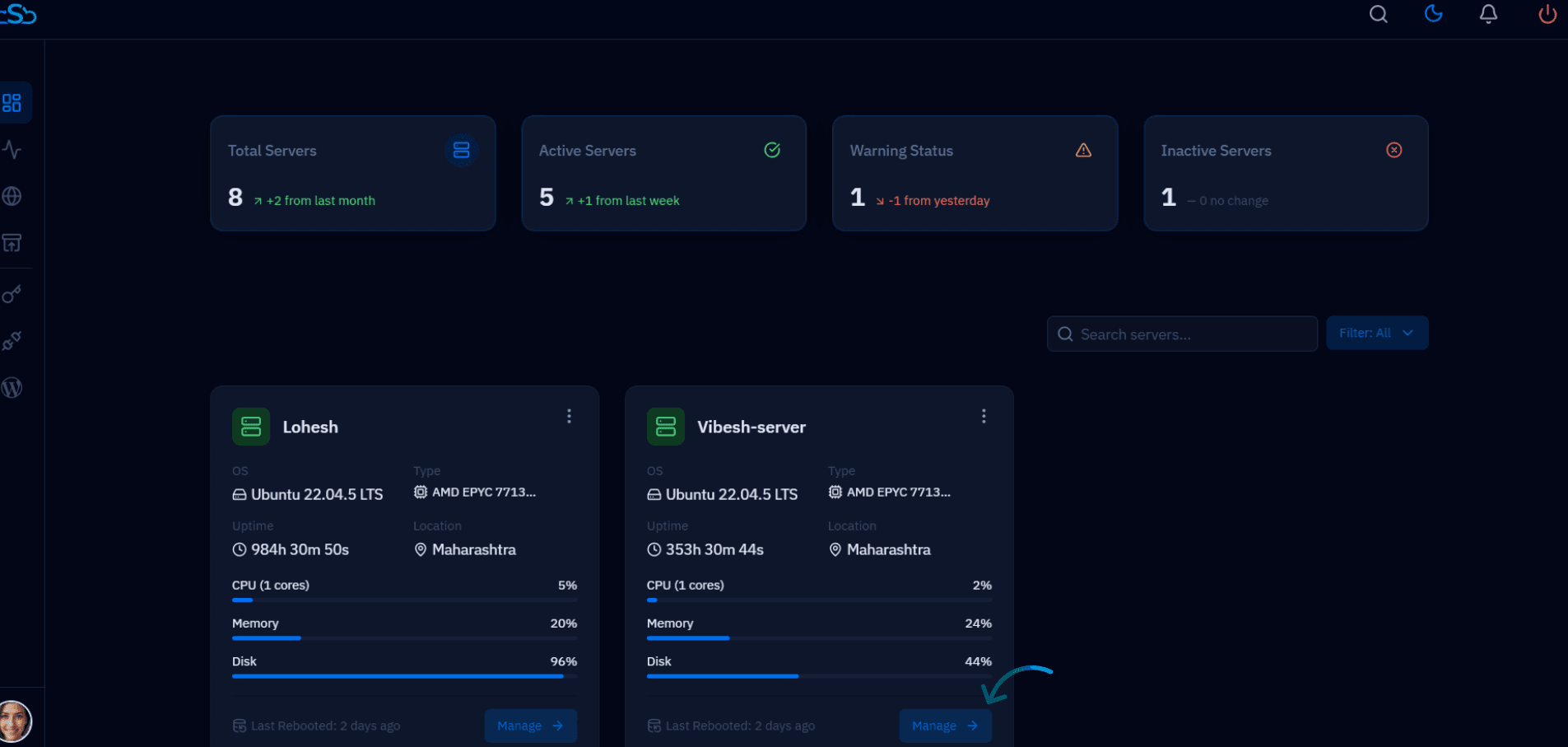
CloudStick is a cloud-based SaaS control panel that connects to any server — AWS, DigitalOcean, Vultr, Hetzner, Linode, Contabo, RackNerd, or a bare-metal box — and lets you manage the entire stack from a central web dashboard without touching the command line. Unlike cPanel and Plesk, which license per account or per domain, CloudStick charges per server slot and includes unlimited websites on every paid plan, making it one of the most cost-predictable options on this list for agencies running many client sites on a single VPS.
Under the hood, CloudStick installs its own namespaced Nginx, Apache, and PHP-FPM builds (versions 8.1 through 8.4, with 8.5 pre-staged) so nothing conflicts with system packages, alongside MariaDB, Redis, Pure-FTPd, Dovecot, and a pre-configured CSF firewall. Connecting a server takes minutes: pick a provider, run the install script (or a Direct Install via SSH), and the CloudStick agent handles vhost creation, SSL, PHP pools, and WordPress installs from that point on.
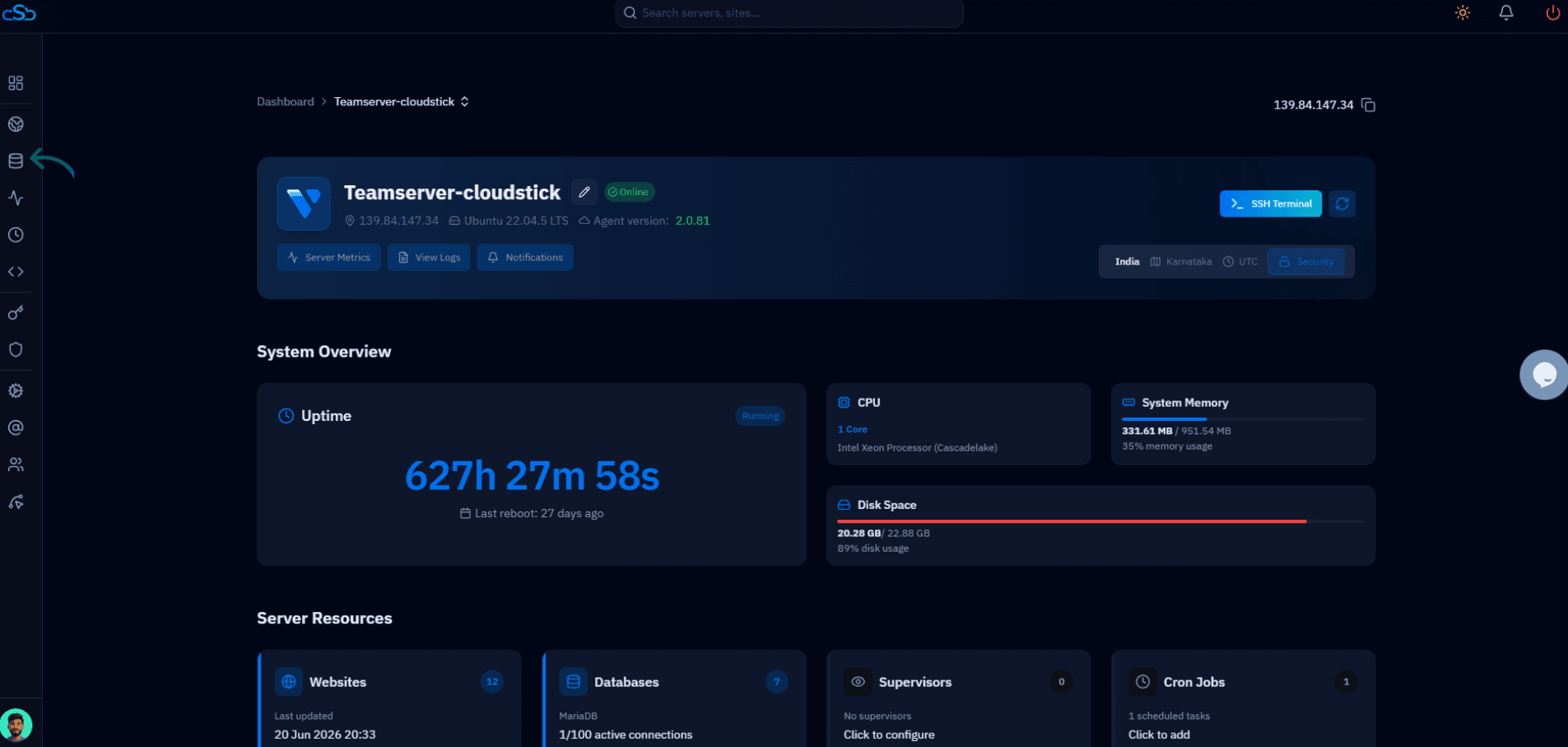
The server summary view gives you an at-a-glance read on server health — uptime, CPU core and model, memory usage, disk usage, and counts for websites, databases, supervisors, and cron jobs — without needing to SSH in or run separate monitoring tooling.
Key features:
- No per-site fees — unlimited websites on every paid plan, unlike cPanel and Plesk's per-account licensing
- Connects to any cloud or bare-metal server: AWS, DigitalOcean, Vultr, Hetzner, Linode, Contabo, RackNerd, and more
- One-click WordPress install, WordPress Magic Link, and WordPress Templates (Business plan)
- Visual database manager, automated backups with configurable retention, and free backup quota on paid plans
- Built-in CSF firewall, SSH key management, and Cloudflare integration for DNS and edge caching
- OpenLiteSpeed available alongside Nginx and Apache — select it per-server for LiteSpeed-class caching and concurrency without leaving cPanel-style workflows behind
- Built-in email hosting — create business email accounts, mailboxes, and manage email settings directly from the panel, no third-party mail service required
- White-label option (Business plan) to fully rebrand the CloudStick dashboard with your own logo and domain and resell it as your own product
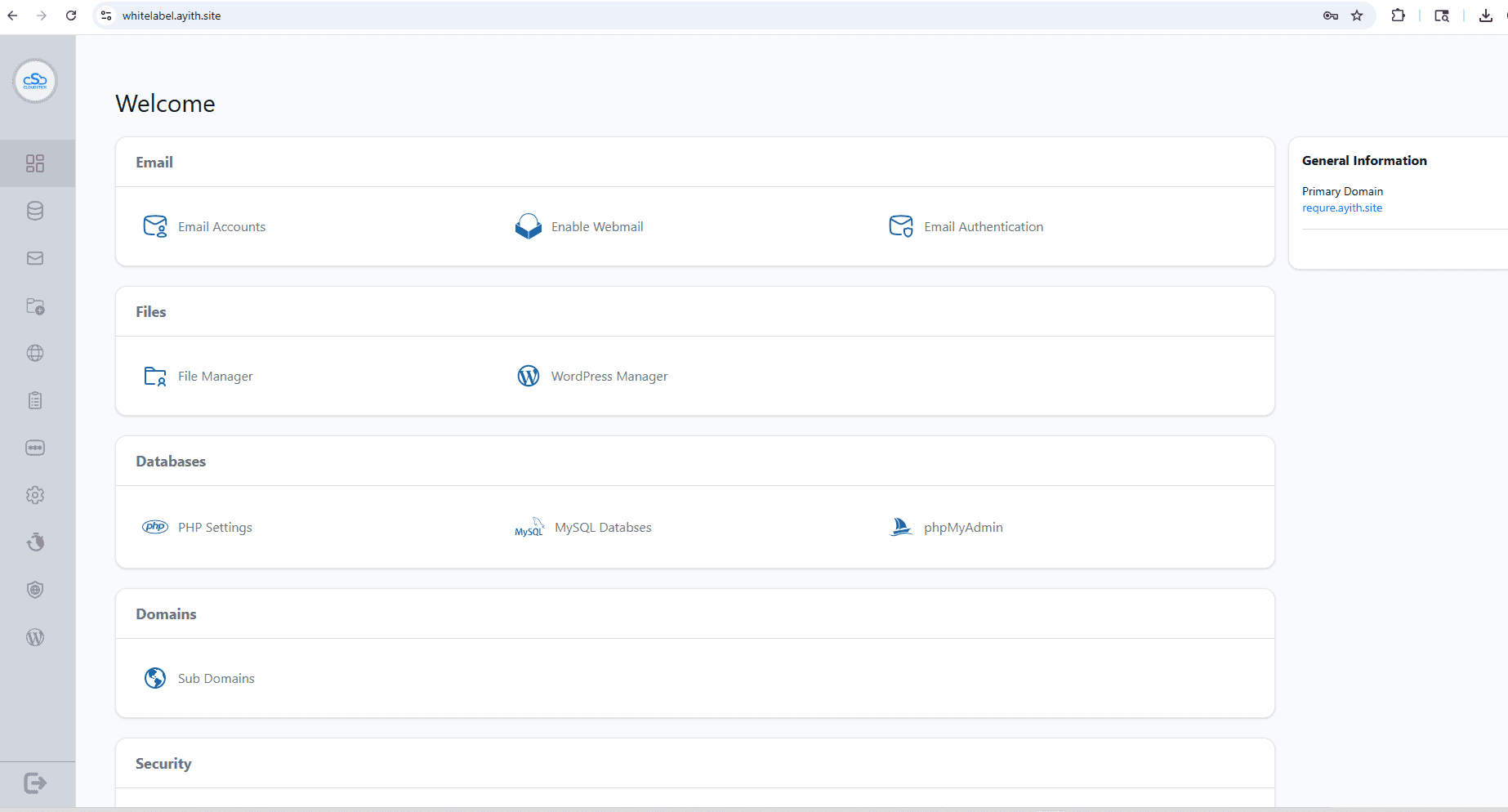
Setting up white-label branding is a Business plan feature: from Business Setup, create a branding profile with your company name, primary and secondary logo URLs, and a theme color, then preview it in the demo panel before applying. Once applied, the rebrand — your name and logo in place of "CloudStick," on your own domain — takes effect instantly across the dashboard for your team and every white-label client. See CloudStick's white-label setup guide for the full walkthrough.
WordPress Manager:
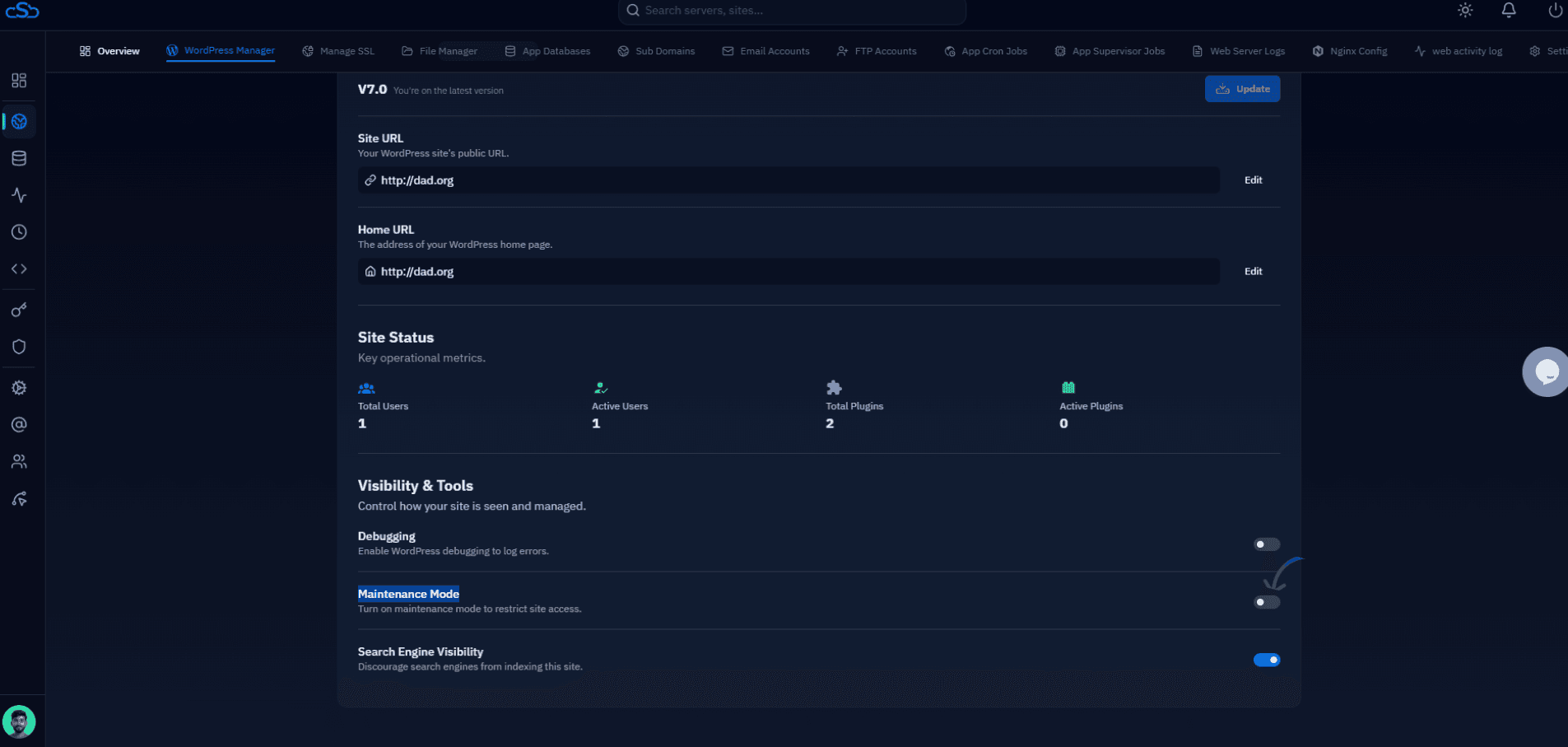
Every WordPress install gets a dedicated WordPress Manager tab covering site URL and home URL configuration, user and plugin counts, one-click debugging and maintenance mode toggles, and search engine visibility control — alongside SSL, file manager, app-level databases, sub-domains, email accounts, FTP accounts, cron jobs, supervisor jobs, web server logs, and Nginx config, all scoped to that one site.
Limitations to know:
- Free plan is capped at 1 server and 1 website — mainly useful for testing before upgrading
- Windows Server hosting is not supported — Linux-only, like most panels in this list except Plesk
- Newer to the market than legacy panels like Webmin or Virtualmin, so the community and tutorial base is smaller
Best for: Agencies and developers who want a lightweight, modern dashboard with no per-site licensing costs — and teams migrating off cPanel who want unlimited websites without a WHM-style reseller layer.
Pricing: Free plan available (1 server, 1 website). Paid plans start at $9/month (Basic), Pro is $19/month with unlimited servers, and Business is $49/month with white-label branding. All paid plans include a 10-day free trial.
Migrating from cPanel to CloudStick is free for up to 25 websites (any host, any application type), handled end-to-end by CloudStick's migration engineers with under 15 minutes of visible downtime. See CloudStick's migration page for the full process and eligibility.
2. CloudPanel — Best Free Alternative for PHP and Laravel Apps
CloudPanel is a modern, free, open-source control panel built specifically for PHP applications — including Laravel, Symfony, WordPress, and Magento. It runs on Nginx and PHP-FPM by default, making it dramatically faster than cPanel's Apache stack for most dynamic PHP workloads. The panel is actively maintained and receives regular updates, with an interface clean enough that developers who hate control panels will actually use it.
What sets CloudPanel apart is its native integration with every major cloud provider: AWS, Google Cloud, DigitalOcean, Hetzner, and Vultr all have optimised CloudPanel deployment images. You spin up a cloud VPS, run the install script, and you have a working panel in under five minutes. SSL certificate management, database creation, PHP version selection (7.4 through 8.3+), and Git-based deployments are all handled from one dashboard without touching the command line.
Key features:
- 100% free with no account limits or licensing fees
- Nginx and PHP-FPM by default — significantly lower memory usage than Apache
- Native cloud provider integrations for AWS, GCP, DigitalOcean, Hetzner
- Git deployment, one-click Let's Encrypt SSL, and database management
- Built-in firewall (UFW-based) and real-time resource monitoring
Limitations to know:
- No email server management — CloudPanel is a web-hosting-only panel
- No DNS management or reseller account support
- Designed for VPS and dedicated server use, not traditional shared hosting multi-tenancy
Best for: Developers and agencies running Laravel, WordPress, or Magento on cloud VPS instances. Teams moving off shared cPanel hosting to their own managed VPS.
Pricing: Free and open-source.
3. CyberPanel — Best cPanel Alternative for WordPress Performance
CyberPanel is the go-to control panel for teams where WordPress site speed is a top priority. It is built around OpenLiteSpeed (the free community edition) or LiteSpeed Enterprise (the paid edition), both of which deliver dramatically better concurrency handling and caching performance than Apache or standard Nginx configurations. When you run the same WordPress site on cPanel/Apache versus CyberPanel/OpenLiteSpeed, the throughput difference under load is immediately measurable.
CyberPanel includes built-in support for LSCache — LiteSpeed's native WordPress caching plugin that replaces the need for WP Rocket, W3 Total Cache, or Redis Object Cache on most deployments. One-click WordPress installations, staging environments, and site cloning are baked in. Free SSL via Let's Encrypt, ModSecurity WAF, ClamAV malware scanning, and Postfix email hosting are all included out of the box.
Key features:
- OpenLiteSpeed handles 3-5x more concurrent connections than Apache at the same RAM
- Built-in WordPress staging and site cloning — no plugins needed
- Integrated WAF via ModSecurity and malware scanner via ClamAV
- Full email hosting with Postfix and Dovecot included
- DNS management via PowerDNS
Limitations to know:
- OpenLiteSpeed has fewer advanced configuration options than the paid LiteSpeed Enterprise edition
- Community support can be inconsistent; documentation gaps exist for edge cases
- LiteSpeed Enterprise carries a per-server license cost on top of CyberPanel
Best for: WordPress-heavy environments where raw performance and caching matter. Agencies managing multiple WordPress client sites on a single VPS or dedicated server.
Pricing: Free with OpenLiteSpeed. LiteSpeed Enterprise adds a per-server licensing fee.
4. aaPanel — Best Free All-in-One Control Panel
aaPanel has emerged as one of the most feature-rich free control panels available in 2026. It supports both Nginx and Apache and allows you to switch between them at runtime without reinstalling anything — a flexibility that no other panel in this list offers. Its built-in app store provides 400+ one-click installations covering not just PHP and WordPress but Node.js, Python, Docker, Redis, MongoDB, and Elasticsearch stacks that cPanel's Softaculous ecosystem simply does not support.
Despite its depth, aaPanel's dashboard is genuinely beginner-friendly. Real-time server monitoring charts, automated database backups to remote storage (Amazon S3, Google Drive, FTP), cron job management, and a visual file manager are all accessible from the main panel without touching the terminal. Multi-server management is available through the Pro version, though the free tier is already capable for single-server deployments of almost any scale.
Key features:
- Free with no account limits; open-source core code
- 400+ one-click app installations including Docker, Node.js, and Python environments
- Runtime Nginx-to-Apache switching without a reinstall
- Email, DNS, and FTP management all included
- Automated remote backups to S3, FTP, Google Drive
Limitations to know:
- Originated in China — some security-conscious operators audit the codebase before deploying in regulated environments
- Community support is primarily through forums and response times vary for complex issues
- Some advanced features (multi-server, advanced WAF) require the Pro tier
Best for: Small-to-medium teams who want a fully featured free control panel that handles web, email, DNS, and database management in a single interface, including non-PHP application stacks.
Pricing: Free core with an optional Pro tier for advanced features.
5. DirectAdmin — Best Budget Commercial cPanel Alternative
DirectAdmin is the veteran budget alternative that cPanel refugees have been migrating to since the 2019 pricing shock. It provides a cPanel-comparable feature set — multi-domain hosting, email accounts, MySQL databases, DNS management, reseller support, and FTP — at a fraction of the cost. If your team is already comfortable with cPanel's account model and just needs the same features without the price tag, DirectAdmin is the lowest-friction migration path available.
DirectAdmin's architecture is lean by design. It runs efficiently on as little as 512MB RAM and starts faster than cPanel/WHM on equivalent hardware. The CustomBuild system lets administrators choose Apache, Nginx, OpenLiteSpeed, or hybrid web server configurations, which gives real flexibility without forcing a full re-architecture when you want to change stacks later. An official cPanel migration tool is included, handling the import of cPanel backups automatically.
Key features:
- Very low resource footprint — runs well on minimal VPS instances
- Full reseller and shared hosting support with WHM-equivalent admin interface
- Flexible web server choice: Apache, Nginx, OpenLiteSpeed, or hybrid
- Official cPanel backup import tool for streamlined migrations
- Active development with regular security patches
Limitations to know:
- UI design feels dated compared to more modern alternatives
- Plugin and extension ecosystem significantly smaller than cPanel
- Not free — a per-server license is required
Best for: Hosting resellers and small web hosting companies migrating from cPanel who need reseller features, shared hosting account management, and a familiar workflow — without cPanel's pricing.
Pricing: From approximately $2/month per server (varies by license type and billing cycle).
6. Plesk — Best for Enterprise and Windows Hosting
Plesk is the closest feature-equivalent to cPanel in the commercial market — and the only major control panel that supports both Linux and Windows Server hosting from the same interface. For organisations running ASP.NET applications, MSSQL databases, or IIS alongside Linux workloads, Plesk is effectively the only viable all-in-one option available in 2026.
Beyond Windows support, Plesk has invested heavily in its extension ecosystem. WordPress Toolkit alone justifies Plesk for agencies managing dozens of client sites: it handles mass updates, security scans, cloning, and staging across every WordPress installation on the server from one screen. Git integration, Docker management, Imunify360 WAF, and SEO advisor tools are all available through Plesk's extension marketplace, making the total feature set considerably broader than any other panel in this comparison.
Key features:
- Only major panel supporting both Linux and Windows Server simultaneously
- WordPress Toolkit for mass WP management: updates, cloning, security scans, staging
- Polished, modern UI designed for non-technical clients as well as sysadmins
- Rich extension marketplace including Docker, Git, SEO tools, and Imunify360
- Enterprise support options and SLA-backed contracts available
Limitations to know:
- The most expensive commercial option in this list (from ~$12.50/month for Web Admin)
- Can feel heavyweight on small VPS instances
- Some extensions are priced separately beyond the base license
Best for: Enterprises, managed hosting providers, and agencies running mixed Linux/Windows server fleets or managing large numbers of client WordPress installations at scale.
Pricing: From $12.50/month (Web Admin), $22.50/month (Web Pro), with higher tiers for hosting-scale accounts.
7. Virtualmin — Best Open-Source Hosting Control Panel
Virtualmin is the hosting-focused module built on top of Webmin, the foundational Linux administration panel. Where Webmin manages the server itself — services, firewall, users, and packages — Virtualmin manages hosting accounts: websites, email, databases, DNS zones, and backups. The result is a complete cPanel and WHM equivalent at zero cost, running on a battle-tested codebase with over 20 years of production use behind it.
Virtualmin GPL (the free tier) covers most use cases: unlimited virtual hosting accounts, Apache or Nginx support, Webalizer and AWStats reporting, Roundcube webmail, Usermin for per-user access, and Let's Encrypt SSL. Virtualmin Professional adds one-click WordPress installer, Cloudmin for VM management, and commercial support. Both tiers are supported on Debian, Ubuntu, CentOS, AlmaLinux, and Rocky Linux.
Key features:
- GPL version is genuinely free with unlimited accounts
- Mature, battle-tested codebase with 20+ years in production
- Full email hosting with spam filtering and Roundcube webmail
- Reseller-equivalent virtual server owner accounts
- Available across Debian, Ubuntu, AlmaLinux, and Rocky Linux
Limitations to know:
- UI is utilitarian and has a steep learning curve for users new to Linux
- Configuration tuning often requires direct command-line knowledge
- Less active community than newer alternatives like CyberPanel or aaPanel
Best for: Linux-experienced sysadmins hosting multiple client domains on a dedicated server who want a fully-featured free alternative to cPanel and WHM without account limits or licensing costs.
Pricing: Free GPL. Virtualmin Professional from $12/year.
8. HestiaCP — Best Lightweight Open-Source Panel
HestiaCP is a community-driven fork of VestaCP that has evolved into one of the most respected lightweight control panels in the Linux hosting space. Its design philosophy mirrors cPanel's simplicity — a clean domain → email → database → DNS hierarchy — while running on a Nginx and PHP-FPM stack that uses significantly less memory than cPanel's default Apache configuration. The panel installs on Ubuntu and Debian via a single script and is ready to add your first domain within minutes.
Unlike some other free panels, HestiaCP has an active GitHub community with regular releases, timely security patches, and detailed documentation. Two-factor authentication, REST API access for automation, DNS clustering between multiple servers, and multi-admin account support are all available without paying anything. ClamAV antivirus, fail2ban intrusion prevention, and Let's Encrypt SSL are built into the core install.
Key features:
- Free, open-source, and actively maintained on GitHub
- Nginx + Apache or Nginx-only stack — your choice at install time
- Full email stack: Exim SMTP, Dovecot IMAP, Roundcube webmail
- 2FA, REST API access, and multi-administrator support
- Let's Encrypt, fail2ban, and ClamAV integration built-in
Limitations to know:
- Smaller community and fewer tutorials than Virtualmin or CyberPanel
- No official commercial support tier available
- Multi-server management requires manual configuration rather than a built-in dashboard
Best for: Small hosting companies, freelancers, and developers who want a lightweight, reliable panel for hosting multiple client domains without the overhead of cPanel or the learning curve of Virtualmin.
Pricing: Free and open-source.
9. ISPConfig — Best for Multi-Server Management
ISPConfig stands apart from every other panel in this list for one critical reason: it can manage multiple servers simultaneously — web servers, mail servers, DNS servers, and database servers — from a single centralised control panel. No other free control panel does this as cleanly or as robustly in 2026.
This distributed architecture makes ISPConfig ideal for hosting infrastructure that has grown beyond a single VPS. Your web files might live on one server, mail on another, databases on a third, and DNS on a fourth — all managed and monitored from one ISPConfig master dashboard. Reseller accounts, client accounts, domain quotas, per-user resource limits, and DNSSEC support are all included. ISPConfig has been in continuous development since 2005 and has comprehensive official documentation covering every installation scenario.
Key features:
- Multi-server management from a single dashboard — unique in the free tier
- Supports Apache and Nginx simultaneously on the same or different servers
- Full email stack: Postfix, Dovecot, Roundcube, SpamAssassin, and ClamAV
- DNSSEC support with PowerDNS integration
- Active development community and comprehensive official documentation
Limitations to know:
- Initial setup is complex and time-consuming — ISPConfig is not a one-click installer
- UI is functional but lacks the visual polish of newer alternatives
- Overkill for single-server deployments; the complexity pays off only at multi-server scale
Best for: Growing hosting providers and infrastructure teams managing multiple servers across different roles (web, mail, DNS, database) who need centralised control at no licensing cost.
Pricing: Free and open-source. Commercial support packages available from the ISPConfig team.
10. Webmin — Best for Advanced Linux System Administration
Webmin is not strictly a hosting control panel — it is a complete browser-based Linux system administration interface. It manages everything that cPanel's underlying system does (Apache, Nginx, MySQL, Postfix, SSH, iptables firewall, cron jobs, system users, and package management) without any of the hosting-account abstraction layer that cPanel imposes on top. This makes Webmin the right tool for sysadmins who want full server control without a hosting panel getting in the way.
Webmin is also the right first stop when you need to manage services on a server running non-hosting workloads: application servers, game servers, CI/CD build nodes, or internal tools infrastructure — where cPanel's hosting model does not apply at all. Combine it with Virtualmin if you later need hosting account management, and with Usermin if you want per-user portal access without giving users SSH access.
Key features:
- Free and BSD-licensed — available on every major Linux distribution
- Full system-level access: firewall, users, packages, services, logs, cron
- Extensible with Usermin (per-user portal) and Virtualmin (hosting layer)
- No account limits or licensing restrictions of any kind
- HTTPS-secured on port 10000 by default
Limitations to know:
- Not a hosting panel — no domain or email account abstraction without Virtualmin
- Steep learning curve; requires solid Linux knowledge to use effectively
- UI is dated and can be overwhelming for new users
Best for: Experienced Linux sysadmins who need a web interface for server management without the overhead and constraints of a hosting-oriented control panel.
Pricing: Free and open-source.
11. OpenPanel — Best for Docker-Based User Isolation
OpenPanel is the newest entrant in this list and takes a fundamentally different architectural approach from every other panel here: instead of shared system resources with per-user quotas, each OpenPanel user gets their own Docker container with isolated MySQL, PHP, Redis, and Varnish instances. This eliminates the "noisy neighbour" problem that plagues traditional shared hosting architectures built on cPanel or any other conventional panel.
OpenPanel's isolation model means one user's runaway PHP process, database query, or file I/O spike cannot affect another user's performance or stability. It also enables per-user custom PHP versions, Redis configurations, and Varnish caching rules — a level of granularity that is architecturally impossible with traditional cPanel multi-tenant deployments. For hosting providers building a new product or platform in 2026, OpenPanel represents where the industry is heading.
Key features:
- Full Docker container isolation per user — eliminates noisy-neighbour resource contention
- Per-user custom PHP versions, Redis, and Varnish configurations
- Container-level resource caps enforced by Docker rather than soft quotas
- Modern, clean interface with REST API access for automation
- Free community tier with a Pro tier for advanced features
Limitations to know:
- Docker overhead means higher base RAM requirement per user compared to traditional panels
- Relatively new project — a smaller community and fewer large-scale production references than established alternatives
- Some legacy PHP applications may behave unexpectedly in containerised environments
Best for: Forward-thinking hosting providers who want genuine per-user isolation and are comfortable building on Docker-based infrastructure. Teams building hosting products on top of a control panel API.
Pricing: Free community tier. Pro tier pricing available on application.
How to Choose the Right cPanel Alternative for Your Use Case
With 11 strong alternatives available, the right choice comes down to answering five questions about your specific situation. Work through these before committing to a migration:
- Single site or many sites? CloudPanel and CyberPanel are ideal for small numbers of sites. ISPConfig, Virtualmin, DirectAdmin, and HestiaCP are built for hosting many domains per server with proper account management and resource quotas.
- Do you need email hosting? CloudPanel does not include an email server. CyberPanel, HestiaCP, Virtualmin, ISPConfig, and DirectAdmin all include full email stacks. Plesk has the most polished email management of any commercial panel, including spam protection policies per-domain.
- What is your budget? If cost is the primary driver: CloudPanel, aaPanel, HestiaCP, Virtualmin, ISPConfig, Webmin, and OpenPanel's free tier cost nothing at all. CloudStick also offers a free tier and, on paid plans, charges per server rather than per site. DirectAdmin is the cheapest commercial alternative. Plesk is premium-priced but justified for enterprise feature requirements.
- What web server do you need? For maximum WordPress performance, choose CyberPanel with OpenLiteSpeed. For modern PHP apps, CloudPanel with Nginx. For Apache compatibility, choose Virtualmin, ISPConfig, or DirectAdmin. For flexibility to switch at runtime, aaPanel is the only option.
- Multi-server or single-server? Only ISPConfig manages a distributed multi-server environment from one dashboard at no cost. Plesk provides this commercially.
- Windows hosting required? Only Plesk supports Windows Server. All other alternatives in this list are Linux-only.
💡 None of these worked? Skip the guesswork.
Get Expert Help →How to Migrate from cPanel to an Alternative: Step-by-Step
Migrating away from cPanel is a methodical process. Rushing it causes downtime and data loss. Follow these steps carefully — or engage professional server migration services if you are working with production sites that cannot tolerate extended downtime.
Before touching anything, generate a full cPanel backup via WHM's Backup Configuration or the cPanel Backup Wizard. Download it to local storage and verify its integrity. List all domains, email accounts, databases, DNS zones, cron jobs, and SSL certificates that need to migrate. Incomplete audits before migrations are the single most common cause of data loss events.
Never install a new control panel over an existing cPanel installation. Provision a clean VPS or dedicated server meeting your new panel's minimum system requirements. For most panels: 1GB RAM minimum, 2GB recommended; Ubuntu 20.04/22.04 LTS or AlmaLinux 8/9 for the best package compatibility. Verify the server IP has clean reverse DNS before starting.
Follow the official installation guide for your chosen alternative. Most modern panels — CloudPanel, CyberPanel, HestiaCP, and aaPanel — provide a one-line install script. ISPConfig and Virtualmin require more detailed step-by-step configuration. After installation, configure your firewall to allow only necessary ports: 80 (HTTP), 443 (HTTPS), your panel's management port, and your SSH port.
For each site: create the domain in the new panel, transfer files via SFTP or rsync, export databases from cPanel's MySQL/MariaDB and import them on the new server, recreate email accounts, and migrate mail data. Tools like imapsync work reliably for IMAP-to-IMAP email migration. Verify file ownership and permissions match what each application expects after transfer.
Export your DNS zone files from cPanel and import them into your new panel's DNS management interface. Issue new Let's Encrypt SSL certificates for all domains on the new server before DNS is changed. Verify certificates cover both the www and non-www variants of each domain, and that certificate auto-renewal is correctly configured.
Before changing any live DNS records, use your local /etc/hosts file to point your test machine at the new server's IP address. Browse every site, submit test forms, verify email delivery, check SSL configuration, and confirm application-specific functionality. Fix every issue found at this stage before the DNS cutover — it is far cheaper to fix problems now than after propagation begins.
Lower your DNS TTL to 300 seconds (5 minutes) at least 24 hours before the planned cutover to speed up propagation globally. When ready, update DNS A records to point to the new server. Monitor both servers during the propagation window (typically 15 minutes to 4 hours for most resolvers worldwide). Keep the old cPanel server fully live for at least 48 hours post-cutover as a rollback safety net.
Once all traffic has transitioned and monitoring confirms no issues, cancel your cPanel license and decommission the old server. Document every configuration decision made during the migration — especially any non-standard PHP settings, custom Nginx rules, or database character set changes — so the next sysadmin who touches the server understands the history.
Security Comparison: How These Panels Stack Up
Security tooling is frequently overlooked in control panel comparisons, yet it directly determines your server's attack surface and how quickly you can respond when something goes wrong. Here is how the top cPanel alternatives compare across the most important security dimensions:
- Firewall management — HestiaCP (UFW and iptables built-in with UI controls), CyberPanel (ConfigServer Firewall-compatible), CloudPanel (UFW-based with panel rules), Virtualmin (iptables via Webmin module). aaPanel has a built-in basic firewall. ISPConfig and Webmin delegate to the OS-level firewall tools.
- SSL/TLS coverage — All 10 alternatives support Let's Encrypt automatic certificate issuance and renewal. Plesk additionally supports premium certificates from DigiCert, Comodo, and others through its commercial extension marketplace. Wildcard certificates via DNS challenge are supported by CyberPanel, Plesk, HestiaCP, and Virtualmin.
- Malware detection — CyberPanel ships with ClamAV built-in and has Imunify360 integration available. Plesk offers both Imunify360 and Kaspersky Anti-Virus integrations. HestiaCP integrates ClamAV. All others require manual ClamAV or Linux Malware Detect (Maldet) installation and scheduling.
- Web Application Firewall — CyberPanel ships with ModSecurity rules enabled by default. Plesk provides Fail2Ban and ModSecurity extensions through its marketplace. CloudPanel does not include a WAF by default but can be hardened with Nginx rate limiting and manual ModSecurity configuration.
- Two-factor authentication — HestiaCP, Plesk, DirectAdmin, and OpenPanel support 2FA natively in their admin interfaces. CyberPanel and aaPanel have built-in 2FA dashboards. Webmin and Virtualmin support PAM-based 2FA modules including Google Authenticator and TOTP apps.
- User isolation model — Traditional panels (cPanel, Virtualmin, ISPConfig) use OS-level user separation with shared system libraries. OpenPanel's Docker-based isolation is the strongest available: each user is in a fully separate container with its own process namespace. CyberPanel and CloudPanel use per-site Linux user accounts with PHP-FPM pools.
For hosting environments with strict compliance or security requirements, pairing any of these panels with professional server hardening work — covering kernel parameters, unused service hardening, intrusion detection, and audit logging — significantly strengthens your posture beyond what any panel provides out of the box.
Conclusion: The Right cPanel Alternative Depends on Your Use Case
There is no single best cPanel alternative in 2026 — the right choice depends on your workload, budget, team expertise, and growth trajectory. For WordPress performance, CyberPanel consistently wins. For free all-in-one simplicity, aaPanel or HestiaCP are hard to beat. For multi-server hosting infrastructure, ISPConfig is in a category of its own. For enterprise Windows and Linux environments, Plesk is the only realistic commercial choice. For modern PHP apps on cloud VPS, CloudPanel is the cleanest starting point available. And for teams who want a modern SaaS dashboard with zero per-site fees, CloudStick is the most cost-predictable pick on this list.
What all 11 alternatives share: none of them charge cPanel's 2026 prices. The six open-source options cost nothing. The commercial alternatives cost a fraction of what cPanel now charges at hosting scale. And every panel in this list is actively developed with 2026-era features — Nginx-first architectures, Let's Encrypt automation, Docker support, and REST APIs — that cPanel's legacy architecture has been slow to adopt.
If you are planning a cPanel migration and want expert guidance on choosing the right panel, configuring it securely, and executing a zero-downtime cutover, CloudHouse Technologies' server management team specialises in exactly this work across all the panels covered in this guide.